SynthConstellation Fleet operations · Config-backup hub

SynthConstellation — one console for the whole fleet.

See every application’s health, queues, and config-sync posture in one place — then open any application’s own console right from the board, with single sign-on, so you view and run your applications from one location. It also runs the customer-controlled config-backup hub — which any enrolled XyDromatics product can use — to keep every product’s configuration recoverable.

PHI-bearing, under your controls. SynthConstellation moves no images and has no clinical function — but its fleet queues surface the patient identifiers your products report, and its sealed audit trail retains them. It operates as a HIPAA Business Associate under your BAA, with role-based access and PHI masking for support.

At a glance

Classification
Non-Device · §520(o)(1)(D)
Data posture
PHI-bearing — fleet queues show patient identifiers; sealed audit trail · no images · BAA
Deployment
Customer-operated console
Platforms
Windows · Linux
Best for
Multi-application XyDromatics deployments
Full regulatory posture →

The problem it solves

A fleet is many consoles and no safety net for their config.

Without it

Run several routers, engines, and archives and you have several consoles to check and no single place to see whether the fleet is healthy. Worse, each product’s carefully-tuned configuration lives only on its own host.

Lose a host and you rebuild its routing rules, destinations, and mappings from memory or a stale export — during an outage, under pressure.

With SynthConstellation

One board shows the whole fleet’s health and queues. Every product seals its configuration to the hub on a schedule, so the fleet’s configuration has a single, versioned, customer-controlled home.

Replace a failed host and reseed its exact configuration from the hub — recovery in minutes, not an afternoon of rebuilding by hand.

What it does

See the fleet, protect its configuration.

See — and run — your application fleet

One board for every application, and one way in.

  • Health, queue depth, config-sync posture, and reachability across every registered application
  • Open any application’s own console straight from the fleet board
  • Single sign-on via delegated identity — the console mints a short-lived, per-request identity for each application, so you don’t log in to each one
  • Search consolidated queues across every application from one place (identifiers masked by your role at each source)
Automated config backup

The customer-controlled, hands-off home for your fleet’s configuration.

  • Every enrolled product seals its configuration to SynthConstellation automatically, on a schedule
  • Per-product versioned backup series, sealed under your Customer key
  • The config-backup hub stores each product's sealed configuration only — never images or patient data
  • Enrolment is configuration on each product; nothing to build per product

Recover fast

The hub is your configuration disaster-recovery source.

  • Restore a product’s configuration from any sealed version in its series
  • Reseed a brand-new replacement application with the exact config of the one it replaces
  • Typed-confirm gates on every restore so a recovery is always deliberate
  • Because the hub holds the fleet’s only copy of that config, it is DR-critical by design

Protect the hub itself

The console that protects the fleet is protected in turn.

  • Sealed, off-site Hub Backup + restore of SynthConstellation’s own database
  • Rebuild the console on a fresh host and restore from the sealed bundle
  • Hash-chained audit trail of every action
  • Role-based access control; Windows (MSI) or Linux (systemd)

See it

One console. Here is what it looks like.

Live captures from a running installation — click any screen to enlarge it.

01

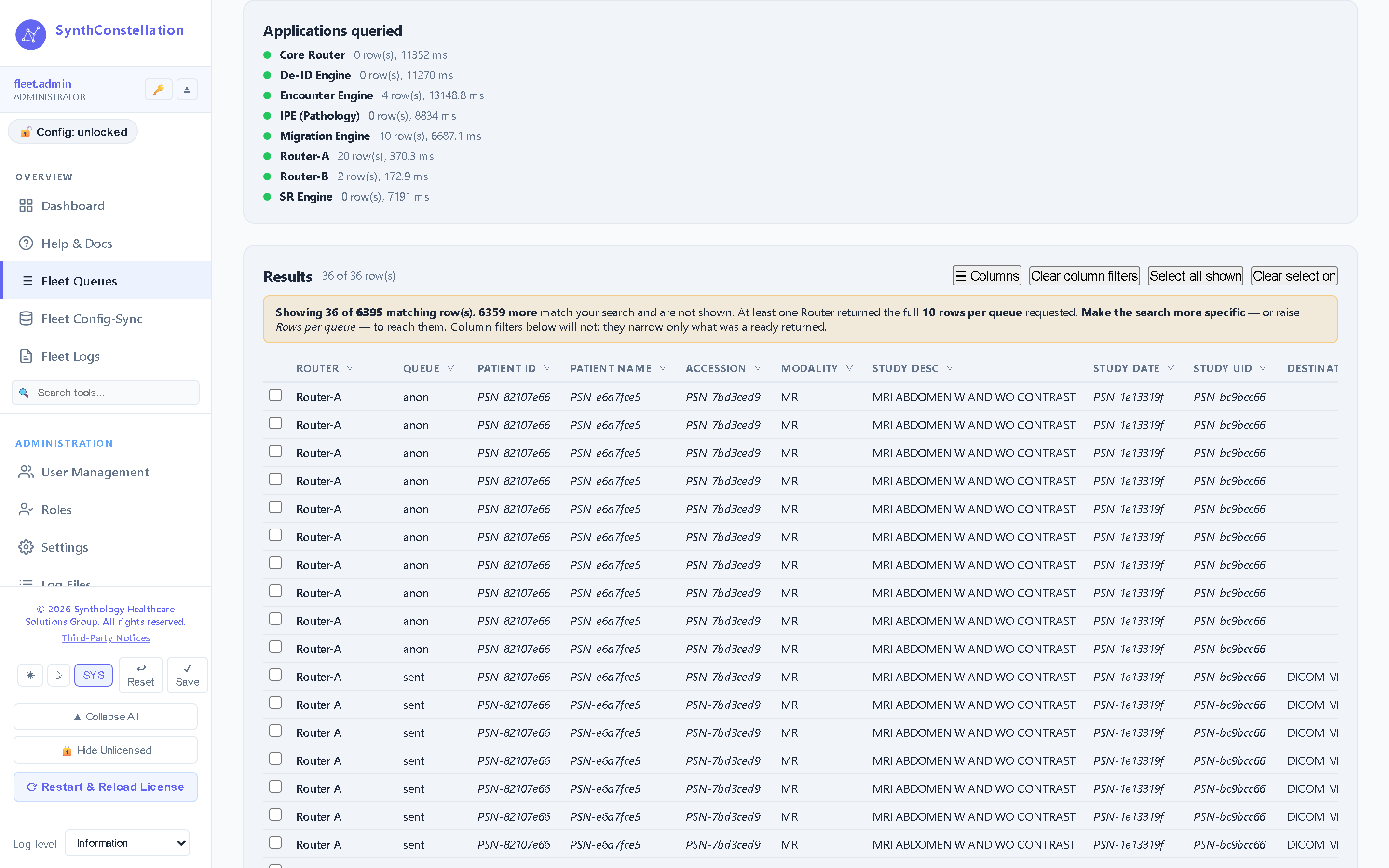
Fleet queues

Search the hold, failed, sent and work queues of every application at once. Identifiers are masked at the source by your role — a member that masks returns a stable PSN- pseudonym the console cannot unmask.

02

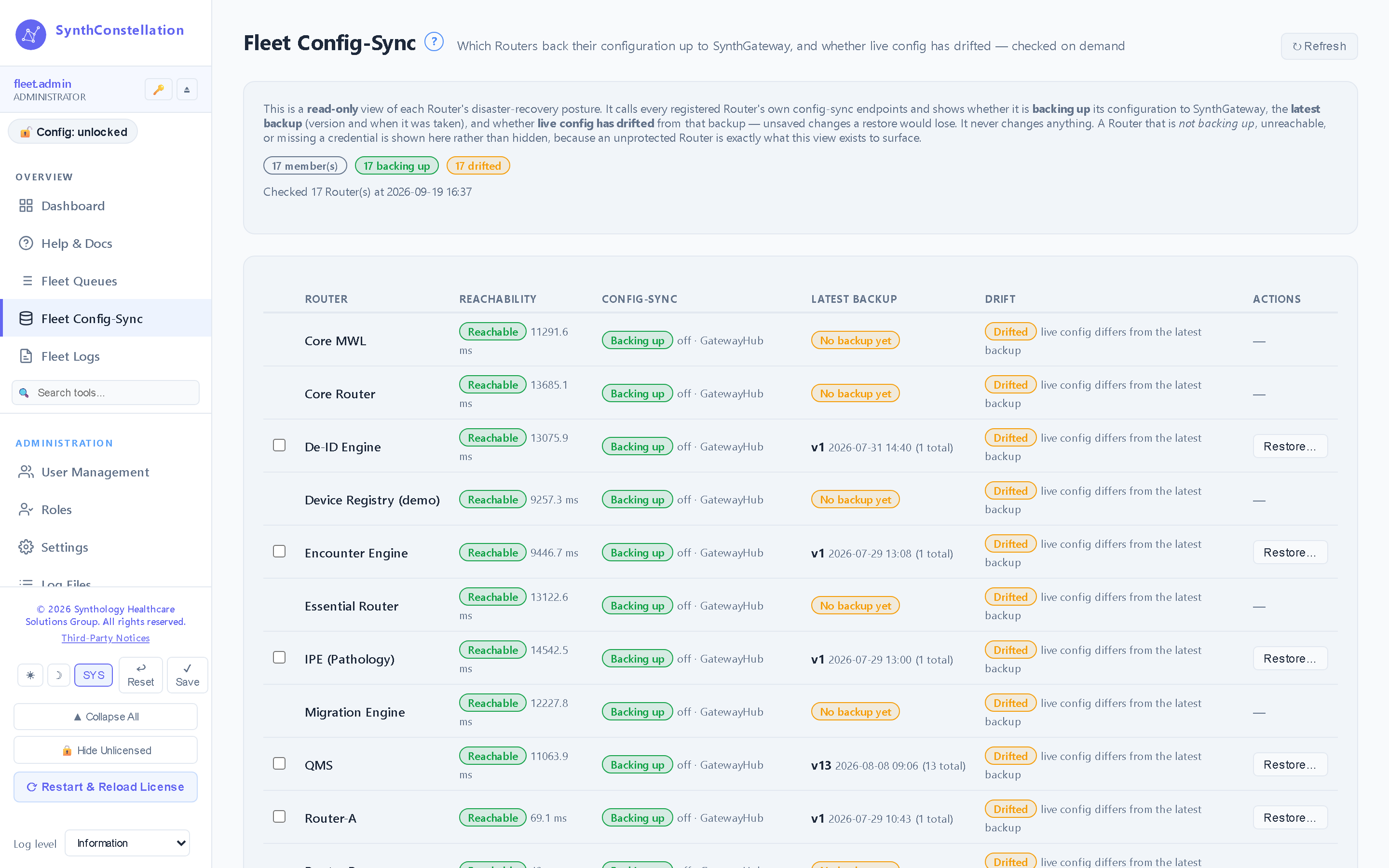
Fleet config sync

Each enrolled product seals its configuration to the hub on a schedule. See every product's backup series, restore any version, or reseed a replacement application from the config it replaces.

03

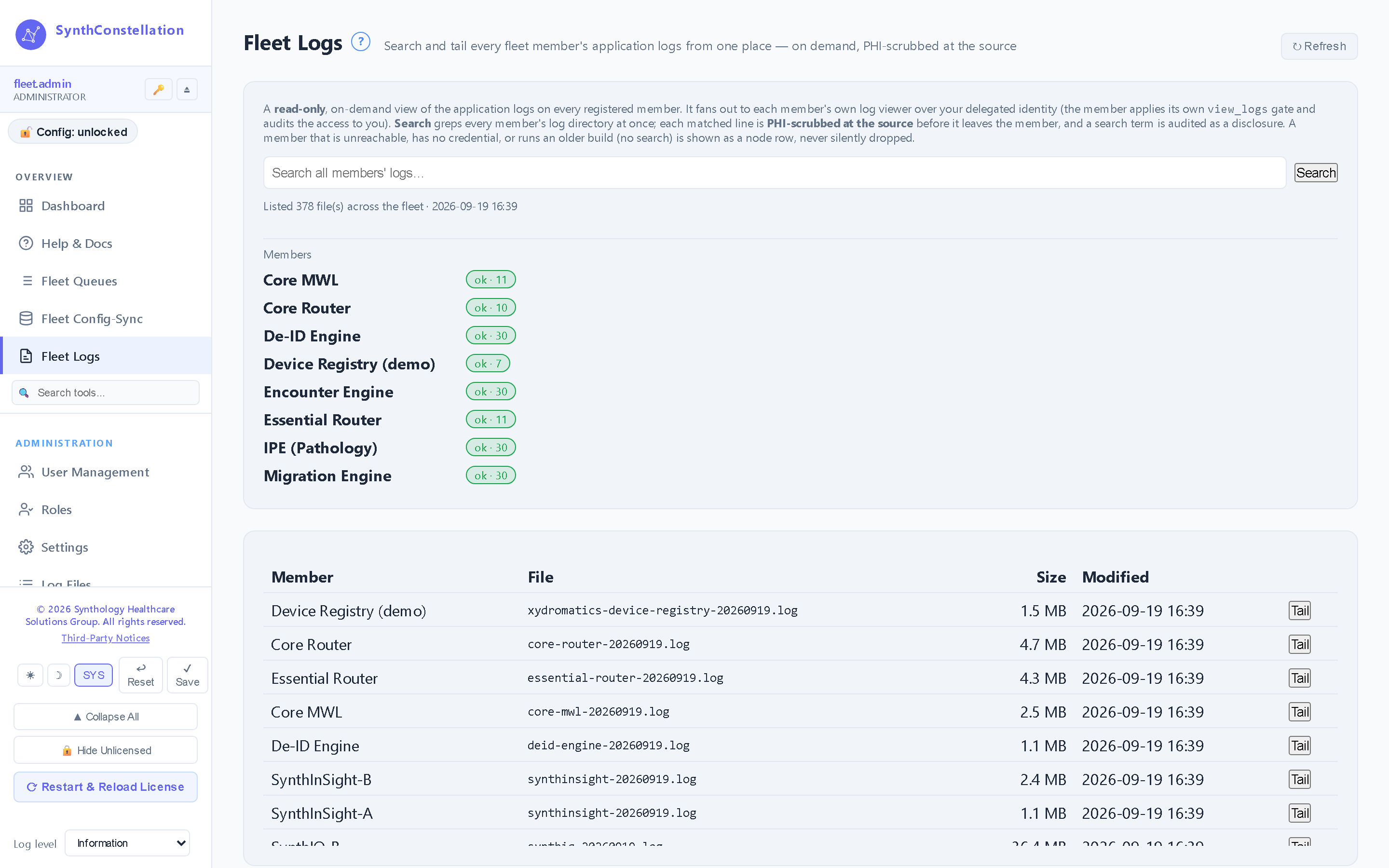
Fleet logs

Read any application's log tail from the console without opening a shell on the host.

04

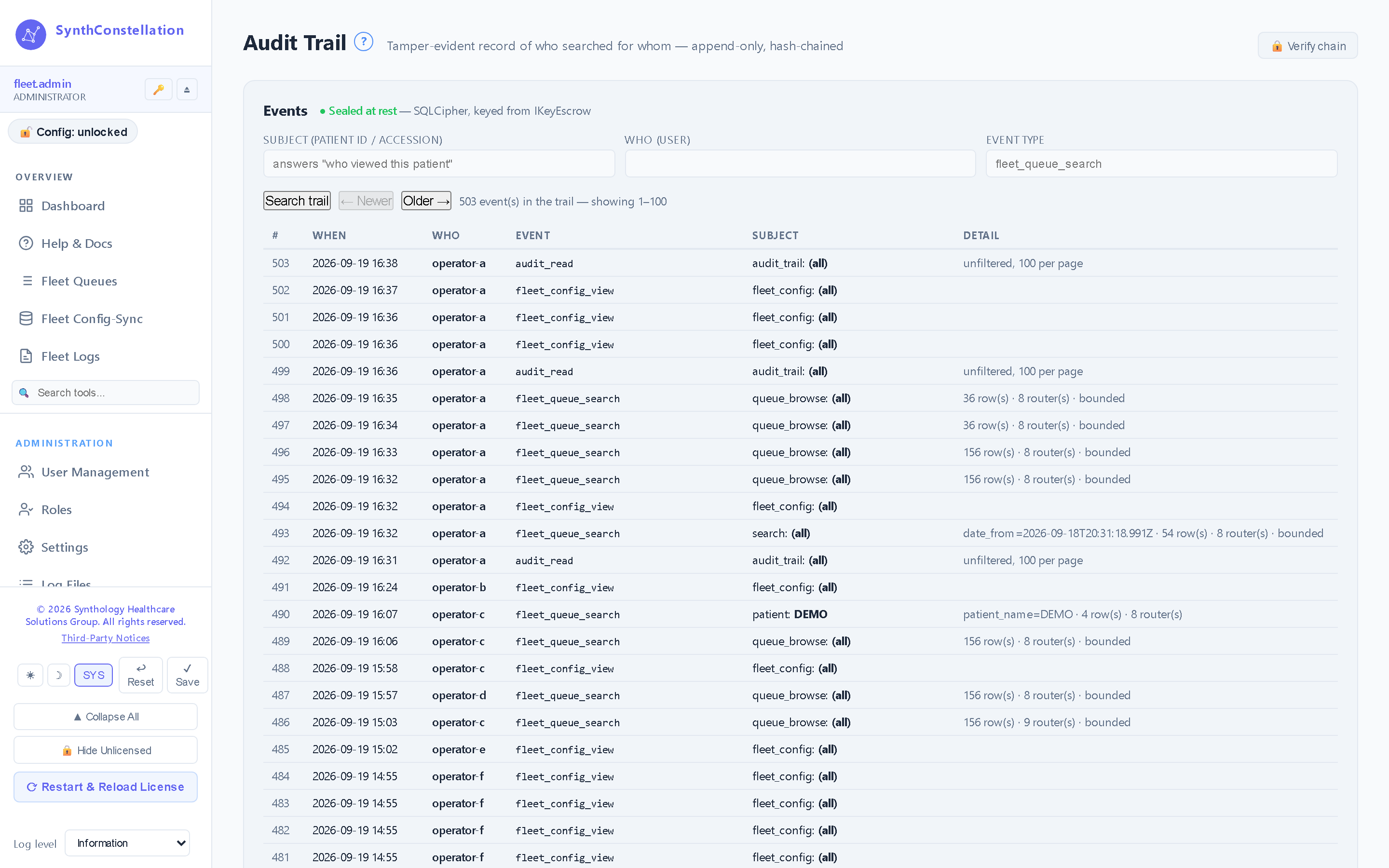
Audit trail

A hash-chained record of every action taken from the console, verifiable on demand.

How the config-backup hub works

Seal, hold, restore.

Step 1

Enrol & seal

Point a product at SynthConstellation in its settings. On a schedule it seals its configuration under your Customer key and publishes it to the hub as a new version.

Step 2

Hold, versioned

The hub keeps each product’s sealed backup series and an audit trail. It holds configuration and metadata only — opaque without your Customer key.

Step 3

Restore or reseed

Restore a product to an earlier version, or reseed a replacement host with the exact configuration it inherits — behind a typed-confirm gate.

The hub protects itself, too. Because SynthConstellation holds the fleet’s only copy of that configuration, it takes a sealed, off-site Hub Backup of its own database and can restore it onto a rebuilt host — so the console that protects the fleet is never a single point of failure.

Availability & posture

Customer-operated, non-device.

SynthConstellation is software you deploy and operate — Windows (MSI) or Linux (systemd). It is non-device software under FD&C Act §520(o)(1)(D): it monitors and navigates an imaging fleet and safeguards configuration, but it moves no images, drives no transfer, and has no clinical function.

Documentation

The controlled-document set.

Current GA release v1.0.2.76 · released 2026-09-18

Every SynthConstellation deployment ships with the documents below, all managed under SynthQMS document control. They are shared under mutual NDA.

What’s new·v1.0.2.76

One console for your XyDromatics fleet — see it, run it, and keep every product’s configuration recoverable

  • A single board for your whole application fleet — health, queue depth, config-sync posture, and reachability across every registered product, at a glance.
  • Open any application’s own console straight from the board with single sign-on, so you view and run your fleet from one place instead of logging into each host.
  • Search consolidated queues across every application from one place — patient identifiers are shown or masked according to your role at each source.
  • Customer-controlled config-backup hub — every enrolled product seals its configuration to the console automatically, on a schedule, so a lost or replaced host reseeds its exact configuration from any sealed version.
  • Protected in turn — sealed off-site backup and restore of the console’s own database, a hash-chained audit trail, role-based access control, and directory (LDAP/AD) sign-in. Activate in the app with a token, and the license stays current automatically.
Document Title Notes
DOC-2026-499 Hardware & Software Requirements (SynthConstellation) Sizing, OS support, dependencies
DOC-2026-498 EULA Annex (SynthConstellation) Annex to the Synthology Master EULA (DOC-2026-063)
DOC-2026-501 End User Guide (SynthConstellation) Fleet console + config-backup hub operator/administrator workflows
DOC-2026-500 Installation Guide (SynthConstellation) Windows MSI deploy + Linux systemd tarball install

See your fleet in one place.

One console for health and queues across every XyDromatics product, and a customer-controlled hub that keeps every product’s configuration recoverable.