Now generally available · Non-device software (§520(o)(1)(D)) · self-hosted or Synthology-hosted multi-tenant ·
Book a demo
Synth family · DICOM result relay · Non-device software
SynthCloudConnect™ —
the cross-site DICOM bridge.
Bridges AI-vendor result delivery into firewall-isolated on-prem
Router fleets. The AI vendor C-STOREs results to a
SynthCloudConnect endpoint; the on-prem Router pulls them down
over an existing outbound-initiated mTLS WebSocket. No inbound
firewall holes; no Synthology-to-customer initiated traffic.
Two deployment modes. Hosted multi-tenant
(Synthology-operated, BAA signed) or self-hosted single-tenant
(customer-operated, customer-CA-rooted). Same binary; the
startup flag picks the mode. Hosted is the default
go-to-market — self-hosted is for customers whose security
posture won't accept Synthology-as-Business-Associate.
AI vendors live in the cloud. On-prem Routers are firewalled. The gap is real.
The pattern that doesn't work today
Your on-prem Router pseudonymizes a CT study and C-STOREs it
to a cloud AI vendor. That works — outbound DICOM C-STORE
from your DC to the vendor's cloud is a standard pattern.
Then the AI vendor produces a result and needs to send it
back. The vendor is in their cloud. Your Router is behind a
firewall that blocks inbound traffic from third parties.
Vendor C-STORE inbound to your Router → blocked. Vendor email
with a link → not clinical-workflow-compatible. Vendor pushes
to your VPN → policy-incompatible with most enterprise
security teams.
With SynthCloudConnect in the path
AI vendor C-STOREs the result to a SynthCloudConnect endpoint
(either Synthology-hosted or customer-hosted in your own
cloud). SynthCloudConnect holds the result in your tenant's
queue.
Your on-prem Router has an existing outbound-initiated mTLS
WebSocket to SynthCloudConnect (same outbound traffic policy
you already approved for SynthGateway support). The
WebSocket carries a push notification of the new result. The
Router pulls the result over the same connection. Forwards
to local PACS via existing DICOM. Zero new inbound firewall
holes; zero customer-side network policy change.
Capabilities
What SynthCloudConnect actually does.
Cross-site result bridging (the core)
Closes the gap where AI vendors live in the cloud and on-prem Routers are firewall-isolated.
AI vendor STOW-RS POSTs the DICOM result to a SynthCloudConnect endpoint (cloud or self-hosted)
SynthCloudConnect holds the result in a per-tenant queue with configurable TTL
On-prem Router pulls result over an existing outbound-initiated mTLS WebSocket
Router forwards the result to local PACS / viewer / EMR via existing DICOM C-STORE
End-to-end: no inbound firewall hole, no customer-side network policy change
Outbound-only customer-side transport
Respects enterprise security policies that forbid inbound traffic from any vendor.
WebSocket initiated FROM the on-prem Router OUT to SynthCloudConnect
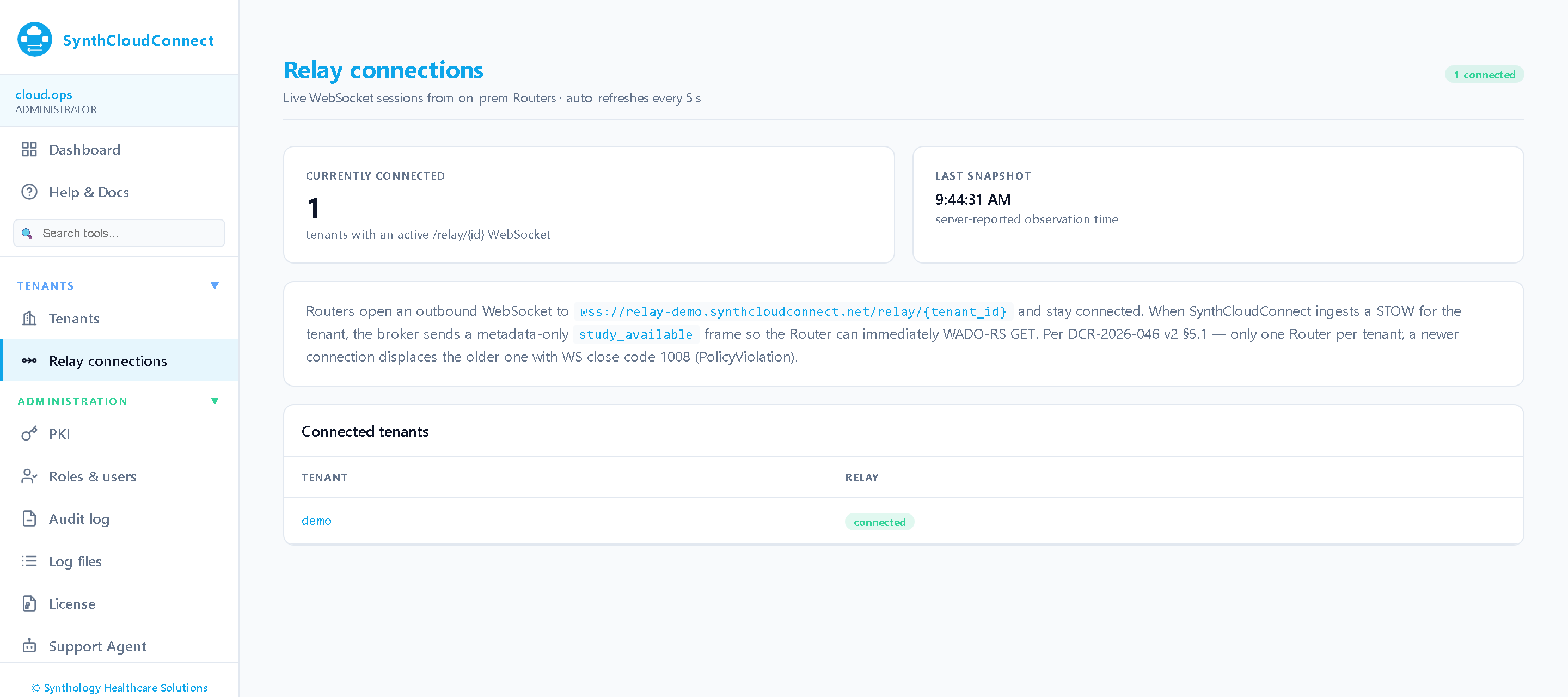
Long-lived outbound-initiated mTLS WebSocket carries the push notification; the Router then pulls each payload over a separate outbound HTTPS WADO-RS GET and DELETE-acks it
Transport adapted from SynthGateway (DCR-2026-025) — proven outbound-initiated mTLS pattern
Customer firewall sees one outbound mTLS connection, no inbound listener
Optional Cloudflare Tunnel mode (Phase 3) eliminates even the outbound TCP allowlist requirement
Per-tenant isolation + audit
Each customer's results live in their own queue + their own crypto subtree.
Tenant identity established at mTLS handshake (cert subject = tenant slug)
Pseudonymization-preserving — results pass through customer keypair tree without re-mapping
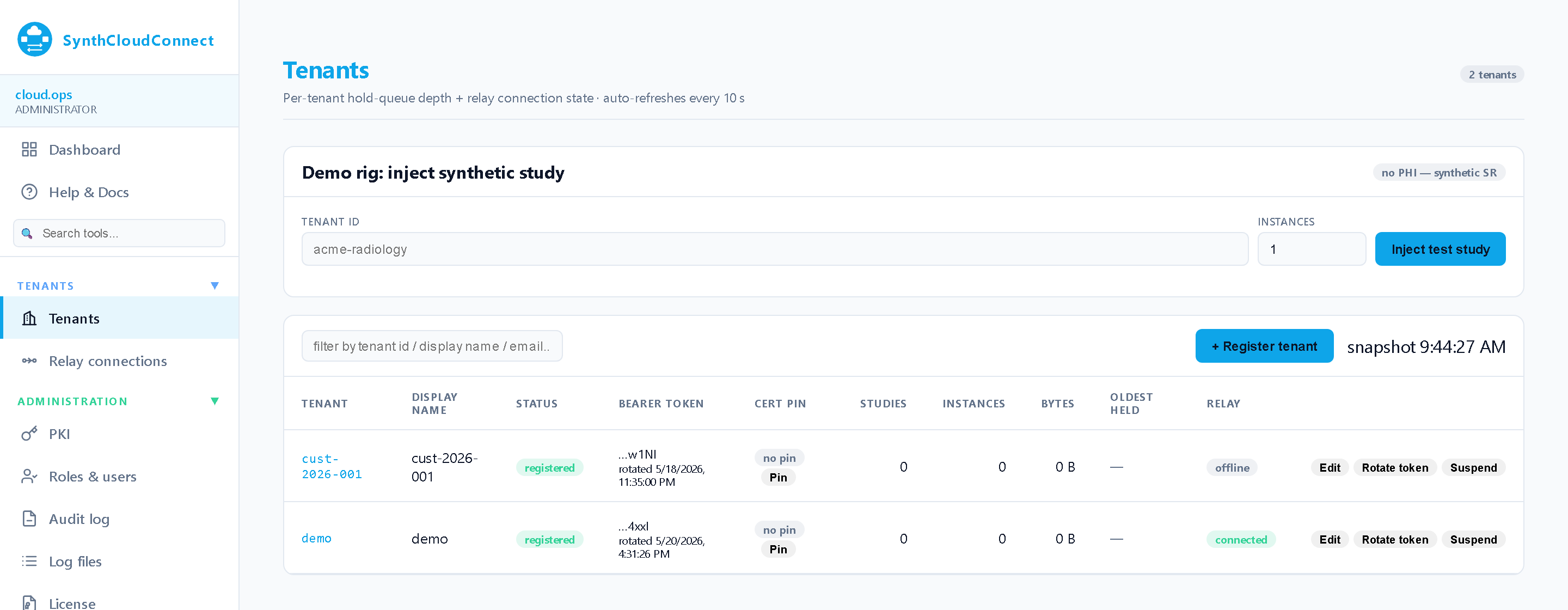
Operations console with per-tenant views — hold-queue depth and relay state per tenant, and an audit log filterable by tenant
Tenant data is segregated where it rests — one SQLCipher hold-queue database and one escrow subkey per tenant. The console itself is a single Synthology-operator surface behind Cloudflare Access, gated by role permissions that are not per-tenant
Self-hosted single-tenant deployment
For customers whose security posture won't accept Synthology-as-Business-Associate.
Same binary as the hosted variant — startup flag picks deployment mode
Customer-owned cloud (AWS / Azure / GCP IaaS) or on-prem (single VM / DC)
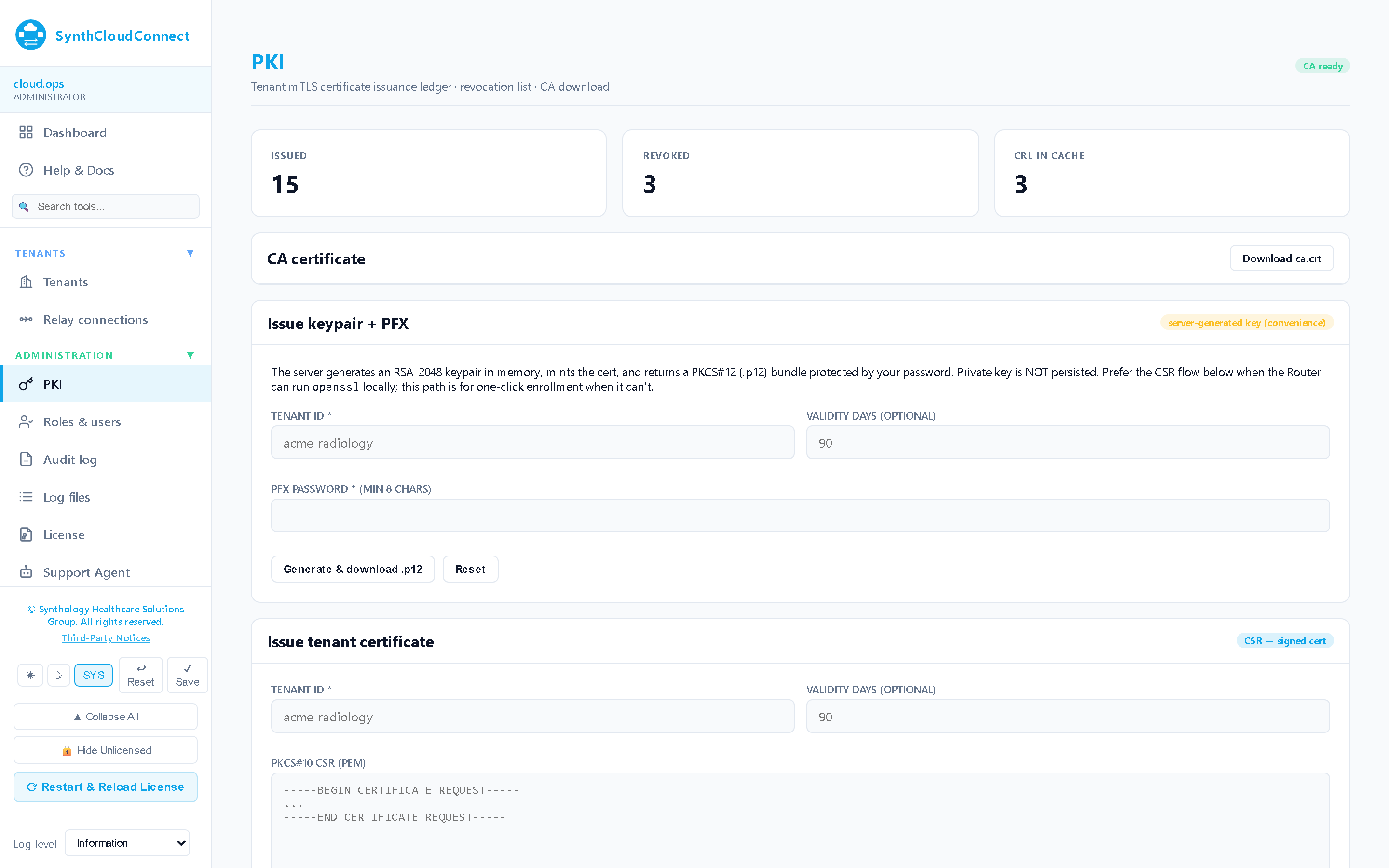
Customer self-issues its own CA at first boot — no Synthology trust root needed
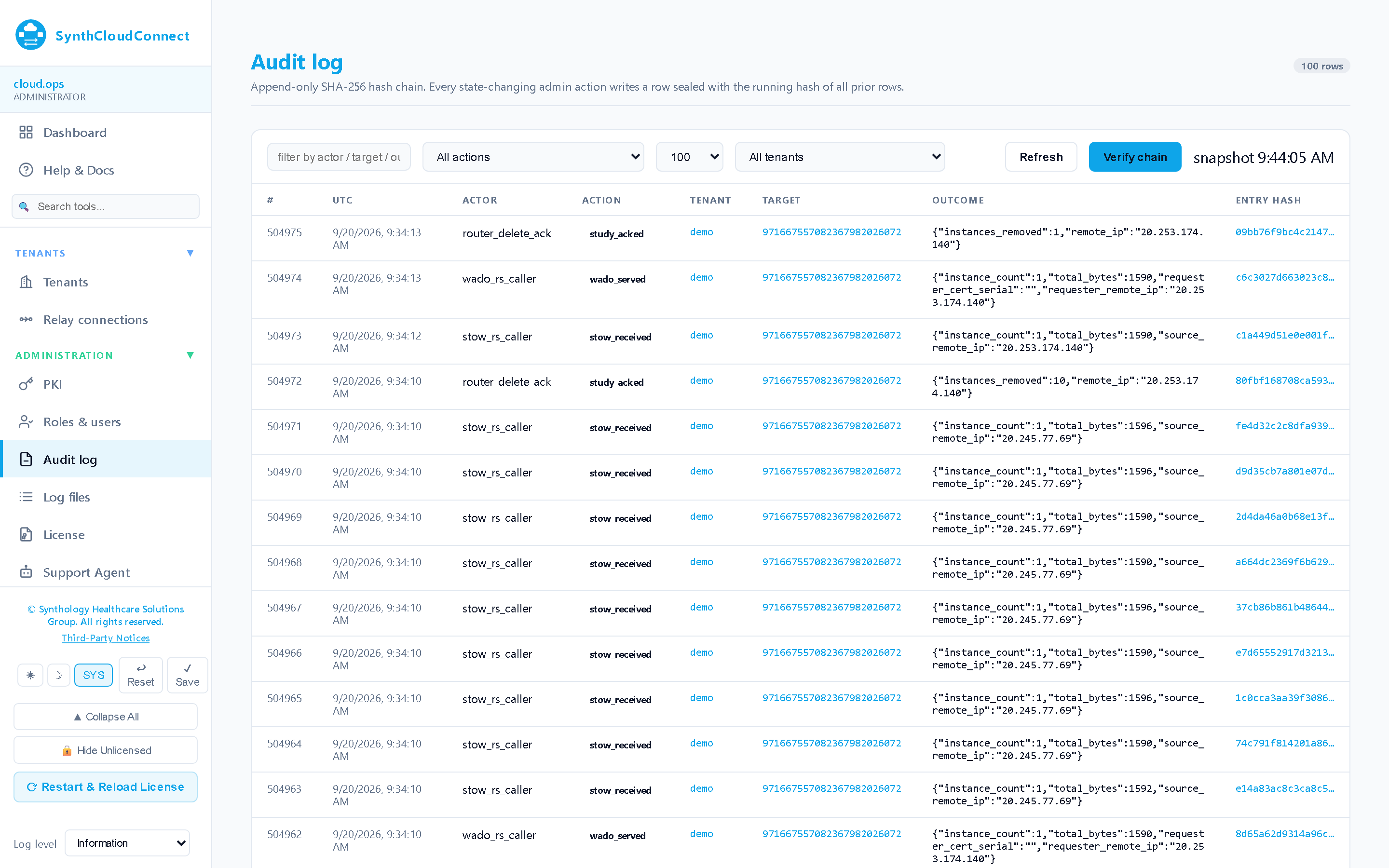
Append-only, hash-chained: every STOW received, every WADO served, every acknowledgement — and every administrative action — sealed with the running hash of all prior rows.
Same .NET host runs in either mode. A startup setting
(SYNTHCLOUDCONNECT_MODE,
or the Mode key in
appsettings) records which deployment this is and is reported
on /api/info. The
difference between the two is operational and commercial — who
runs the host, who holds the licence, who schedules upgrades
— not a different code path.
Hosted variant: Synthology-operated multi-tenant cluster (Azure Central US Phase 1; multi-region Phase 4). Per-tenant subscription with metered overages on volume. Continuous upgrade cadence; customer never schedules an upgrade.
Self-hosted variant: customer-operated single-tenant. Same .NET binary, --mode=self-hosted startup flag. Perpetual .lic file. Customer-driven upgrade cadence matching the rest of the Synthology fleet.
Transport: outbound-initiated mTLS WebSocket from on-prem Router → SynthCloudConnect endpoint. Long-lived connection; push notifications and result pulls multiplex over the same channel. Same transport pattern proven by SynthGateway since 2026 Q2.
Trust roots: every deployment — hosted or self-hosted — bootstraps its own CA at first boot, sealed under IKeyEscrow, and issues the per-tenant Router client certificates from it. On-prem Routers enroll against that CA.
Common use cases
Three deployment patterns.
Pattern 1
AI vendor → on-prem Router result delivery
The flagship deployment. Your AI vendor lives in their own cloud, your Router lives in your DC behind a firewall that blocks inbound. SynthCloudConnect bridges the gap with no firewall changes.
Flow
1On-prem Router sends pseudonymized study to AI vendor (existing outbound C-STORE, unchanged)
2AI vendor processes and produces a result (DICOM SR, derived SC, or DICOM PR)
3AI vendor C-STOREs result to SynthCloudConnect endpoint (configured destination)
4SynthCloudConnect holds the result, sends push notification over the on-prem Router's open WebSocket
5On-prem Router pulls the result, forwards to local PACS / viewer via existing DICOM
Pattern 2
Multi-site result aggregation
You operate a federation — multiple imaging centers, multiple Router fleets, one AI vendor contract. Each site sends to AI; each site needs its OWN results back. SynthCloudConnect routes results to the originating tenant by mTLS cert subject.
Flow
1Each Router fleet establishes its own outbound mTLS WebSocket to SynthCloudConnect (one per tenant)
2AI vendor includes tenant identifier in C-STORE association (or embedded in study metadata)
3SynthCloudConnect routes result to the matching tenant's queue
4Each tenant's on-prem Router pulls only its own results — strict tenant isolation
Pattern 3
Customer-hosted single-tenant (compliance-driven)
You're in a regulatory regime (e.g., a country with data-sovereignty laws, or a customer with internal "no third-party BA" policy) that requires SynthCloudConnect to run in your own cloud. Same product, customer-operated.
Flow
1Customer deploys SynthCloudConnect into their own environment using the Windows MSI
2Customer remains the HIPAA covered entity; no BAA with Synthology required for this product
3Customer self-issues CA; Routers connect to the customer-hosted endpoint
4AI vendors C-STORE to the customer-hosted endpoint; results never leave customer cloud
Integration points
What SynthCloudConnect connects to.
On-prem endpoints (the result recipients)
XyDromatics Router — first-class integration; AI-vendor routing rules already produce the outbound C-STORE
SynthIQ — receives result via DICOM C-STORE; affinity store ensures it lands on the original-study backend
Customer PACS / viewer — direct delivery via the on-prem Router's existing forwarding rules
AI vendor connections (the result senders)
Aidoc, Riverain, RapidAI, Gleamer, Cleerly, Hyperfine — any AI vendor that produces DICOM SR / SC / PR results
STOW-RS delivery to a SynthCloudConnect endpoint (standard DICOMweb, no proprietary protocol)
Tenant identified by the DICOMweb route path; the connection is authorised by mTLS client certificate or bearer token
Cloud infrastructure (hosted variant)
Synthology-owned Azure subscription (Central US Phase 1)
Multi-region expansion in Phase 4 (West US, East US, Western Europe)
Cloudflare in front of the public endpoint for DDoS protection + cert management
Self-hosted deployment targets
Phase 1: Windows MSI installer
Phase 2: MSI installer for Windows VM (same packaging as SynthIQ + Router)
Phase 2: RPM / DEB for Linux VM (same systemd unit pattern as the Router family)
Phase 3: Helm chart for in-customer Kubernetes
Availability & roadmap
Generally available — and still expanding.
SynthCloudConnect is generally available: deploy it self-hosted
today, or use the Synthology-hosted multi-tenant service. The
phases below show what has shipped and what lands next as
commercial demand allows.
Hosted variant expands to West US + East US + Western Europe regions. Tier 2 Premium per-tenant dedicated namespace or VM for customers with stricter isolation requirements.
Documentation
The controlled-document set.
Current GA release
v1.0.2.111·released 2026-08-07
Every SynthCloudConnect deployment ships with the documents below, all managed under SynthQMS document control. The DICOM Conformance Statement is publicly available; the rest are shared under mutual NDA.
What’s new·v1.0.2.110
General availability — the approved agreement, resilient access recovery, and self-service config backup
▸General availability of SynthCloudConnect — the cross-site relay that bridges an off-site AI or analytics vendor to your on-prem result-delivery point, transiting already-pseudonymized studies (no clinical content is browsed on the console).
▸Ships with the approved End-User License Agreement, presented on first login with a scroll-to-accept gate.
▸Resilient console access — admin-lockout recovery via a break-glass path and an offline recovery tool, so you can always regain access to your own deployment.
▸Config-driven mutual-TLS on the relay, plus self-service configuration backup and restore to off-site storage.
▸Built-in Log Files viewer and expanded, task-oriented in-app Help that names the permission each action needs.
Annex to the Synthology Master EULA (DOC-2026-063)
DOC-2026-397
Penetration Test Results (SynthCloudConnect)
Available under NDA
DOC-2026-398
QA Runner Manual (SynthCloudConnect)
Internal QA + customer-validated test runs
DOC-2026-367
User Guide (SynthCloudConnect)
Operator + administrator workflows
DOC-2026-368
Installation Guide (SynthCloudConnect)
Includes MSI deploy + Linux tarball install
Frequently asked
The questions prospects ask.
Why not just open an inbound firewall hole to the on-prem Router?
Most customer security policies forbid inbound traffic from third-party vendors — including from AI vendors and from Synthology itself. Enterprise security teams require all customer-to-cloud traffic to be outbound-initiated and TLS-terminated at the customer perimeter. SynthCloudConnect respects this posture; the on-prem Router opens the WebSocket *outward*, and the cloud side never initiates anything customer-facing.
How is this different from SynthGateway?
SynthGateway carries telemetry + support traffic (engineer remote-access sessions, health metrics, log telemetry) — a control plane. SynthCloudConnect carries clinical-result payloads — a data plane for DICOM. They use the same outbound-initiated mTLS transport pattern but serve different traffic. They can coexist on the same on-prem Router fleet.
What's the regulatory classification?
Non-device software under FD&C Act §520(o)(1)(D) — the statutory carve-out (21st Century Cures Act §3060, 2016) for software solely transferring, storing, converting formats, or displaying medical device data. Same framework as XyDromatics Router, SynthIQ, and the rest of the Synthology software fleet. SynthCloudConnect transits DICOM result communications and holds them temporarily; it does not alter image data, generate diagnostic output, or make clinical decisions. Full classification analysis: DCR-2026-047.
How long do results sit in the queue?
Configurable per-tenant TTL. Default 72 hours, and a tenant can be given a longer or shorter window. After TTL expires, results are purged. On-prem Routers typically pull within seconds of the push notification, so steady-state queue depth is near-zero. The TTL bounds how long a held result is retained before purge; delivery is push-notified over the live relay connection, so treat the on-prem listener as a monitored service rather than relying on the window to absorb an outage.
Is SynthCloudConnect available today?
Yes — SynthCloudConnect is generally available. Non-device software under §520(o)(1)(D); USPTO trademark Serial 99824305 filed; the DCR-2026-046 product definition and DCR-2026-047 v2 regulatory classification are approved in PROD QMS. Deploy it self-hosted today with the Windows MSI, or use the Synthology-hosted multi-tenant Tier 1 Standard service. Container images, Linux package formats and additional hosted regions (Tier 2 Premium) follow on the roadmap.
Does SynthCloudConnect replace SynthGateway?
No — they're complementary. SynthGateway handles operational traffic (remote support, health telemetry); SynthCloudConnect handles DICOM result traffic. A customer site can run both; each has its own WebSocket, its own license feature flag, and its own trust path. They share the underlying transport pattern (mTLS, Cloudflare-fronted endpoint) but are independent products with independent license + audit posture.
See SynthCloudConnect in action.
SynthCloudConnect is generally available — deploy it self-hosted
today, or run it on the Synthology-hosted multi-tenant service.
Book a demo to see the cloud-to-on-prem result path end to end.