Ingest from any modality, route by rules, transform tags,
anonymize, prefetch, hold and release. The flagship workflow
orchestrator — both the operating-control plane for an
imaging department and the integration hub between modality,
EMR, PACS, VNA, and reporting.
Organized by functional area. Every capability listed below is
part of the shipping product — not roadmap.
DICOM I/O
Standard inbound and outbound paths for any modality or downstream system.
C-STORE SCP (DICOM Store) — inbound from any modality or upstream node
C-STORE SCU — outbound to any DICOM-conformant destination
STOW-RS endpoint — modern HTTP-based store
WADO-RS retrieval and QIDO-RS query
Q/R SCU — query/retrieve from upstream PACS/VNA
Q/R SCP — serve C-FIND / C-MOVE (plus QIDO-RS / WADO-RS) from a bounded, sealed local study cache, so a site with no archive can run Query/Retrieve without a VNA. A cache, not an archive: studies age out on a TTL / size cap (hard delete)
Load-balanced destination pools with outbound study affinity — a whole study sticks to one pool member, with per-member health and automatic failover
Configurable AE-Title list with per-AE access control
Routing & rule engine
The core. Rules execute on every received study, deciding what to do with it.
Match conditions on any top-level DICOM tag by hex group/element (modality, body part, station name, custom private tags), plus built-in matches on modality, study description, institution and patient ID
Conditions combine with AND, with per-condition negation (not-equals / not-contains); exclusion clauses additionally support OR-grouped AND blocks
Time-of-day and day-of-week windows on prefetch rules and scheduled query-retrieve jobs
Routing log — every decision recorded, so you can see exactly which rule matched a study and why
Rule export / import as portable JSON — keep the exported set in your own version control
Transformation
In-flight modification of studies as they pass through the router.
Tag-level rewrite (set / unset / map values)
Order reconciliation — before a completed study is sent, a rule can reconcile its DICOM tags against the matching authoritative order (matched by Accession Number) — resolved from the local order store or, as a fallback, an external provider’s Modality Worklist fetched by an initiating C-FIND with no extra HL7 ingest — e.g. correcting Study Description to the ordered procedure text; per-tag modes run from verify-only through fill-when-empty to always-take-the-order, while patient-identity and laterality tags default to flagging a mismatch rather than overwriting it — a flagged study parks as a reconcile exception for review and release
Anonymization profiles aligned with DICOM PS3.15 Annex E
Keyed-hash pseudonymization — same patient always maps to the same anon-ID; a per-customer site encryption key is the keying material (shared across all router-pattern products in the customer's portfolio for cross-product consistency)
Reversible pseudonymization with gated re-identification — role-gated de-anonymization, a tamper-evident hash-chained re-identification audit trail, stable same-patient linkage across studies, and AI-vendor round-trip restore. Designating an honest broker and obtaining any IRB authorisation remain the customer's governance, not something the Router performs
Pixel-data redaction with regional masks
Character-set normalization (force SpecificCharacterSet to UTF-8), per destination
Per-destination lossless transfer-syntax transcoding on egress — JPEG Lossless, JPEG 2000 Lossless, or decompression to Little Endian. Lossy targets are refused by design, and a transcode that cannot complete fails to the Failed Queue rather than silently dropping pixel data
Per-destination transformations (different downstream systems get different versions)
Audit log of every transformation applied
Hold queue & manual release
Studies routed to the hold queue wait for human approval before forwarding.
Sensitive-study hold rules (VIP, employee, behavioral health, etc.)
Reviewer queue UI with reference image preview — display-only, not for diagnostic interpretation
Release — to the normal rules or to chosen destinations — or delete, individually, in bulk, or by whole study; permission-gated
Optional auto-purge policy with a configurable age limit (default 7 days, off unless enabled)
Reviewer audit trail — who released or deleted which study and when, with the rule that held it recorded on the study
Prefetch
Pull priors and related studies ahead of an appointment to make them available before reads.
HL7-driven prefetch (ADT or scheduling messages trigger pulls)
Worklist-driven prefetch (pull studies the worklist references)
Patient-history prefetch — priors for a given MRN, bounded by a configurable look-back window, modality filter and study cap
Scheduled prefetch windows (overnight pull for tomorrow's appointments)
Q/R against multiple upstream archives in priority order
HL7 v2 integration
Two-way communication with the EMR for orders, results, and worklist generation.
HL7 v2 ingest — ADT, ORM, ORU message types
HL7 v2 emit — order acknowledgements, results
SMART on FHIR app launch — OAuth2 authorization with an R4 CapabilityStatement
Worklist generation (DMWL — Modality Worklist) from EMR orders
HL7 to DICOM-tag mapping (configurable per-interface)
Message-level audit log — every message persisted with its raw HL7 text and ACK/NAK, plus an operator inject tool that feeds a message to a listener as if it arrived on the wire
Operations & administration
The day-to-day surfaces operators use to run the router.
Web administration UI with shared sidebar shell (consistent across the XyDromatics family)
Role-based access control with permission catalog (every page assignable)
Append-only, hash-chained audit log — tamper-evident and independently verifiable
Health endpoint for external monitoring, plus SynthGateway telemetry and email alerting
Rule sets export as portable JSON for your own change control
See it
The routing platform, on screen.
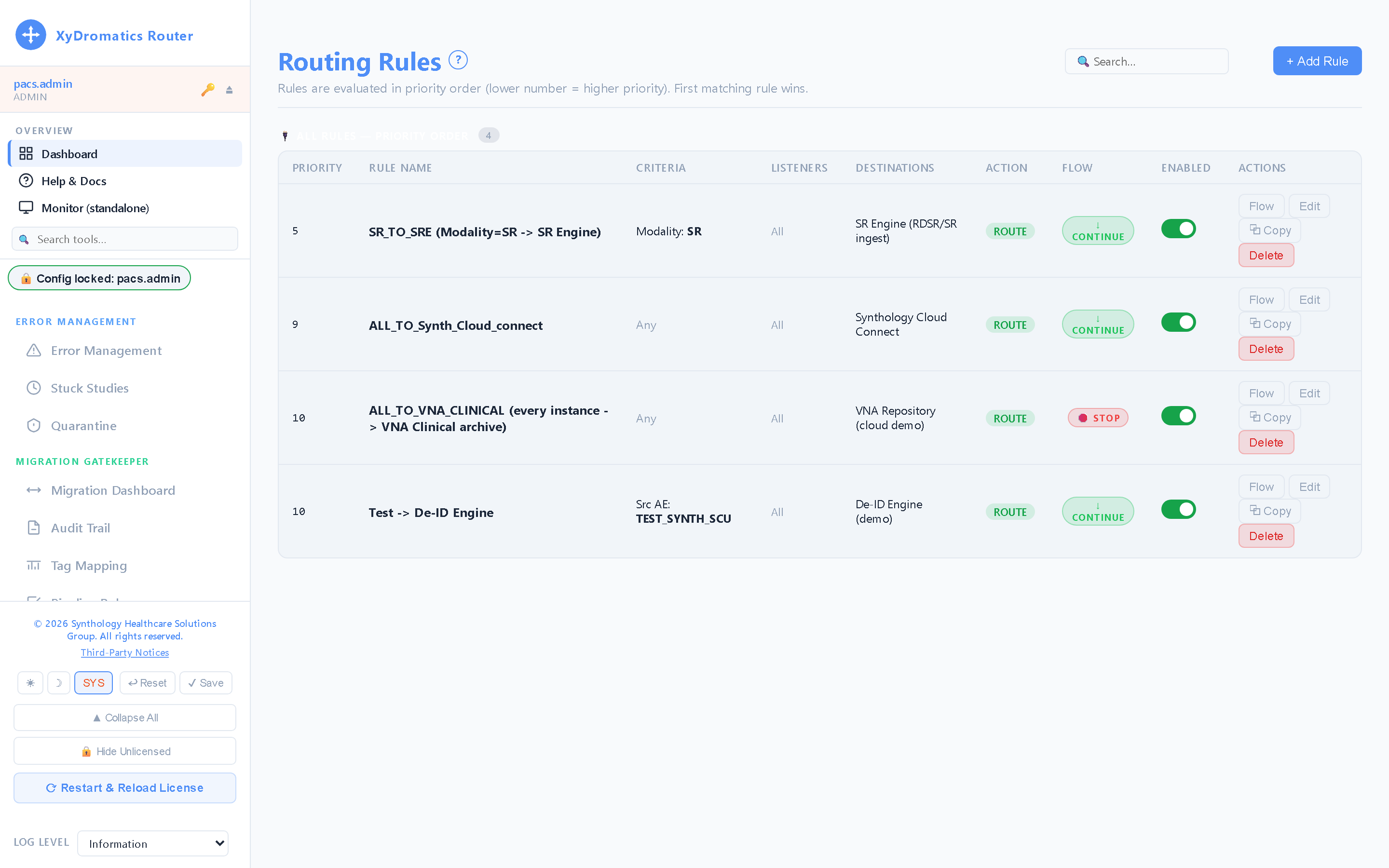
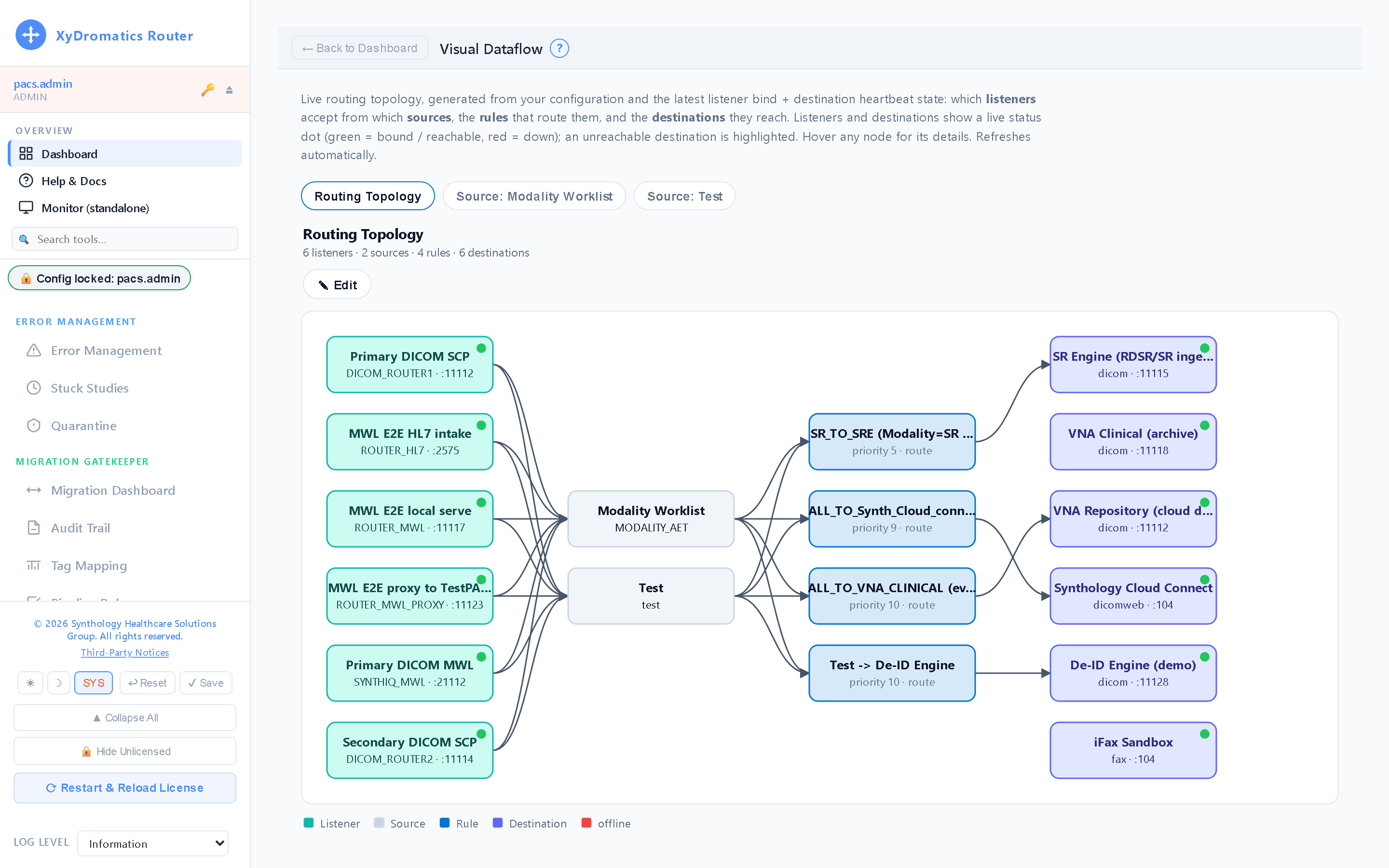
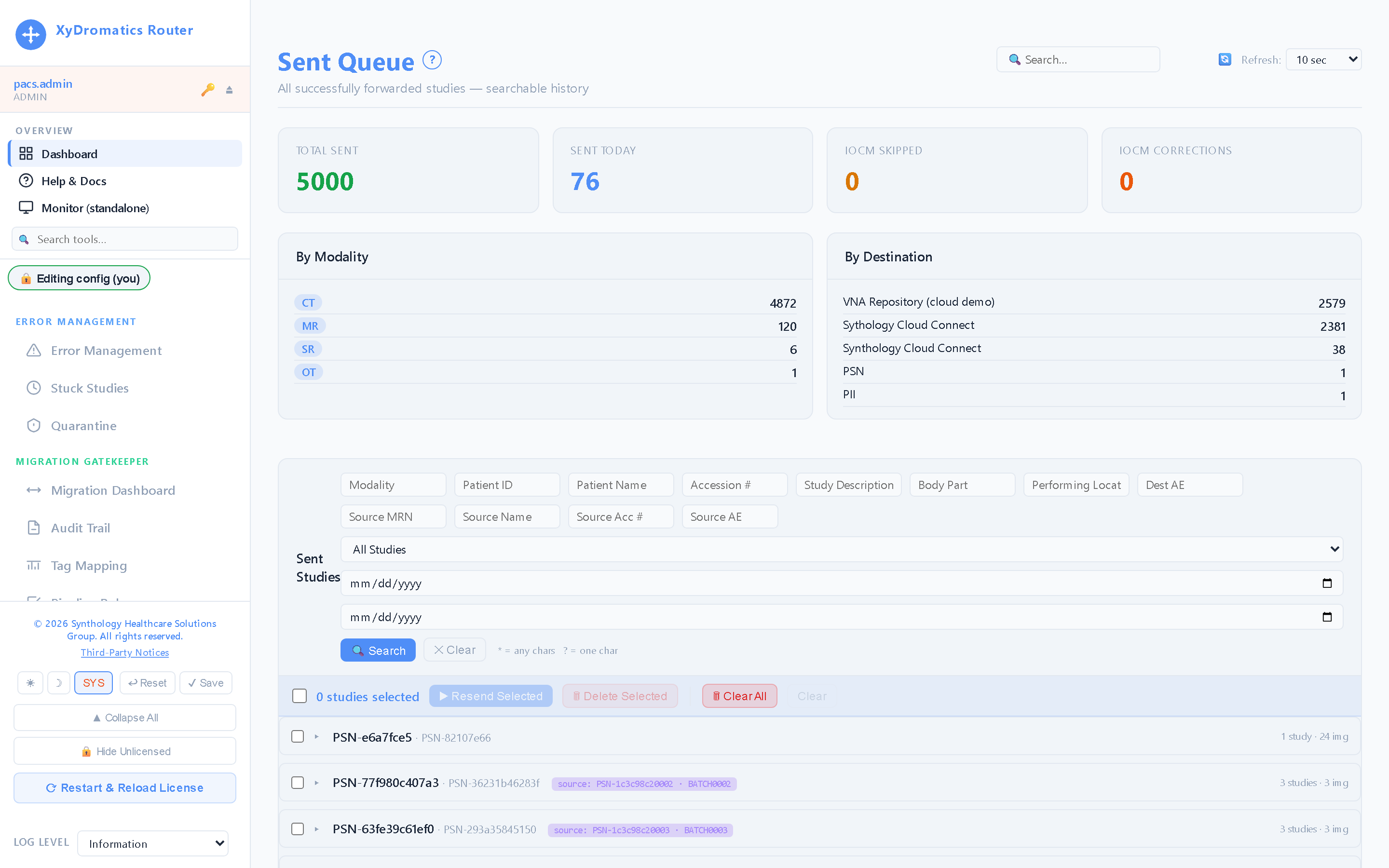
Live captures from a running installation — click any screen to enlarge it.
01
Routing rules
Match on any DICOM attribute — modality, AE title, station, description — and send to one or many destinations, with hold, prefetch, tag coercion and anonymization per rule.
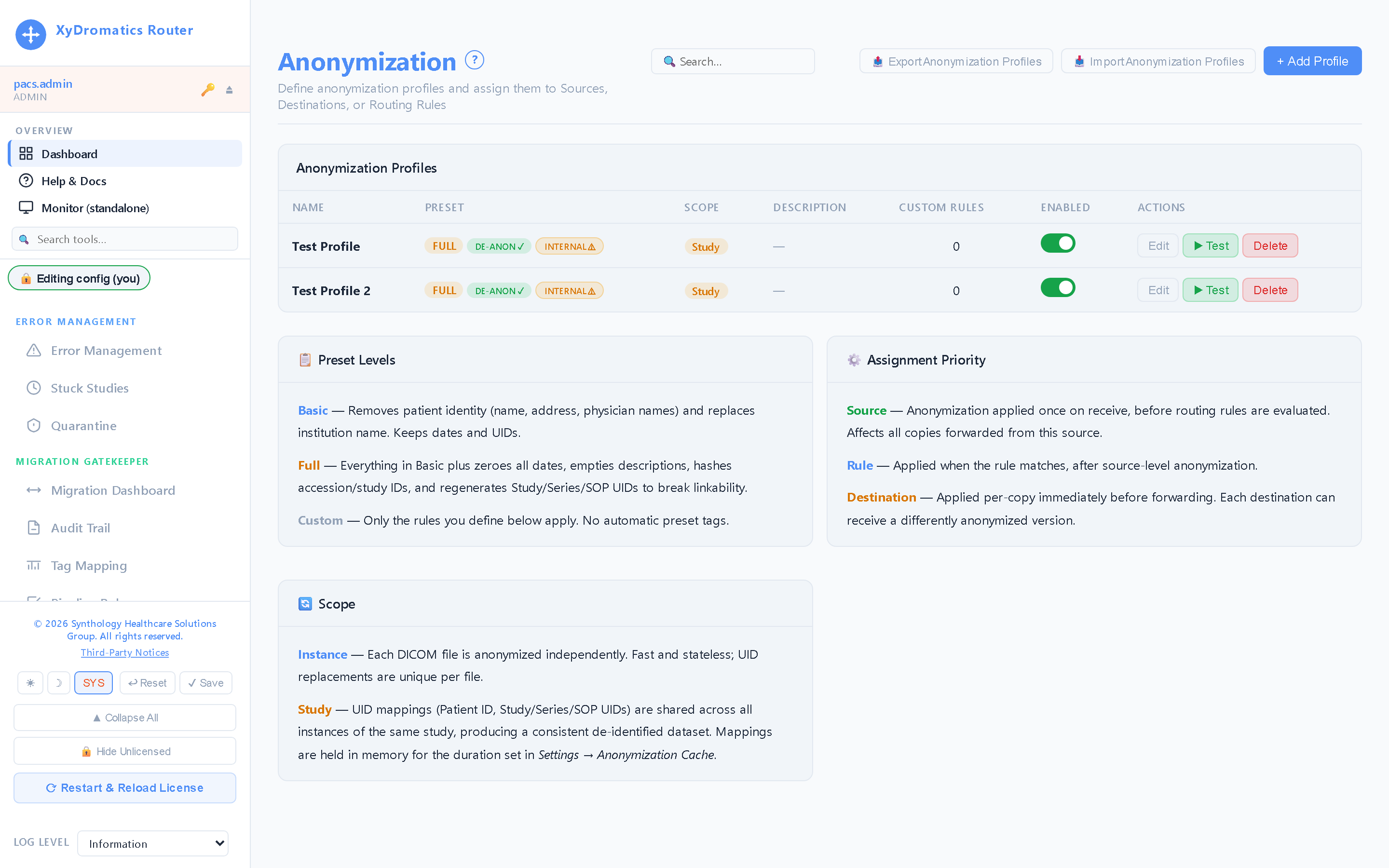
Named profiles — basic, full, or custom tag-by-tag — applied on export, with a test panel that shows exactly what a study will look like before it leaves.
One modality. Two routers. No single point of failure.
A modality sends to SynthIQ. SynthIQ balances every study across two XyDromatics Routers by study affinity. Both routers deliver to the archive — while you watch.
Modality→
SynthIQ→
Router-A + Router-B→
Archive
Four live consoles, one batch of studies. Identifiers are shown exactly as a masked-role operator sees them.
Architecture
Where the Router sits.
Conceptually: between modalities and downstream systems. In
practice, often in front of the entire imaging stack as the
single integration point that routes, transforms, and gates
every study that flows through.
The Router is a single binary on Windows or Linux. Each Router
owns its own queues and storage — there is no shared filesystem
to build and no cluster to quorum. Availability is handled in
front of the pool by SynthIQ,
and is included with every licence rather than gated behind a
tier. State (queue depth, audit log, rule history) persists in a
backing database on that node — an embedded SQLite database
encrypted at rest with SQLCipher AES-256 under your key-escrow
master. It is auto-created and auto-managed on first run, so there
is no external database server to provision, license, patch or
back up separately.
Common use cases
Five typical deployment patterns.
Most Router deployments combine two or three of these. The
patterns below are common building blocks; real deployments
mix and match.
Pattern 1
Modality consolidation hub
All modalities forward to the Router; the Router applies routing rules to fan studies out to PACS, VNA, AI applications, and remote-read destinations.
Flow
1Modality (CT, MR, US, etc.) emits study via DICOM Store
2Router receives, validates, and applies rule engine
3Conditional forwards to one or more destinations
4Audit log records the full path of every study
Pattern 2
PACS migration cutover
During a PACS replacement, the Router runs in front of both old and new archives. Studies double-route during the parallel-run window; cutover is a config flip.
Flow
1Modalities continue sending to Router (no modality-side change)
2Router writes to old + new archives simultaneously
3Reads validated against new archive in parallel
4Cutover = single rule change to drop old destination
Pattern 3
AI-application integration (with optional pseudonymization on egress)
New AI vendor needs a feed of relevant studies (e.g., chest CTs for triage). The Router applies a body-part + modality filter and forwards a copy without disrupting the primary clinical workflow. For AI vendors, the Router can pseudonymize on the way out and re-link findings on the way back. Because the Router retains the means of re-identification, the forwarded data set remains coded protected health information — pseudonymization is a minimum-necessary control, not HIPAA de-identification under 45 CFR 164.514. Whether a BAA is required is a determination the covered entity makes with its own privacy counsel.
Flow
1Define rule: modality=CT AND body part=CHEST
2Optional: anonymization gate applies the configured profile and replaces direct identifiers with a keyed-hash pseudonym (HMAC of the original value under the per-customer site key). The pseudonym is reversible by the Router holding that key, so the output remains coded PHI
3Forward to AI vendor STOW-RS endpoint (vendor sees only anon-ID if anonymization is on)
4AI vendor returns findings via HL7 ORU or DICOM SR tagged with anon-ID (or original UID)
5Router re-identifies findings using the retained mapping and routes back to PACS / EMR linked to the correct patient
Pattern 4
VIP / sensitive-study handling
Hold-queue rules catch studies matching VIP / employee / behavioral-health criteria. Studies wait for reviewer approval before downstream forwarding.
Flow
1Study arrives matching hold-criteria rule
2Routed to hold queue, no downstream forward
3Reviewer (clinical-systems / privacy team) confirms the routing and disclosure decision, then releases or adjusts the destination set — an administrative decision, not a clinical interpretation
4On approval, study forwards per normal rules with audit trail
Pattern 5
Anonymized research-feed
The IRB approves a protocol and the de-identification or Limited Data Set profile it requires. The Router applies that profile and forwards a copy to a research archive without affecting the clinical archive. Whether the result qualifies as de-identified under 45 CFR 164.514, or as a Limited Data Set under a DUA, is the customer's IRB and privacy-office determination.
Flow
1Clinical study arrives normally
2Rule matches research-criteria (modality, date range, study description)
3Anonymization transformation applied per IRB-approved profile
4Anonymized copy forwards to research archive (e.g., XyDromatics Research)
5Original clinical study forwards to clinical archive unchanged
Integration points
What the Router connects to.
Router integrates by conforming to the standards, not by
building to each vendor. If a system speaks DICOM, DICOMweb or
HL7 v2, Router connects to it. The lists below name
systems commonly found in the stack, organised by layer, as
examples of where Router sits — they are not vendor
certifications or partnerships.
Target: any DICOM-conformant archive — including XyDromatics Repository
Bidirectional Q/R for prefetch + parallel-run migrations
EMR / EHR
Epic Radiant (radiology) + Cupid (cardiology)
Cerner PowerChart
HL7 v2 ADT / ORM / ORU
SMART on FHIR (OAuth2) app launch and authorization
Worklist generation (DMWL) for modality consumption
Reporting
Microsoft (Nuance) PowerScribe
Jacobian (M*Modal) Fluency for Imaging
Epic Radiant native reporting
Outbound report distribution via HL7 ORU
AI applications
STOW-RS forward to AI vendor endpoints
Aidoc, Riverain, Gleamer, RapidAI, Heart Lung & Vessels, Cleerly, etc.
Findings ingest via HL7 ORU or DICOM SR (Structured Report)
Re-routing of AI findings back to PACS / EMR
Image sharing / portals
Hyland PowerShare
Hyland Modlink
GE HealthCare (Intelerad) InteleShare
Custom portal endpoints via STOW-RS
Availability
Resilience is included, not a tier.
Put two or more Routers behind
SynthIQ with a designated standby.
When every primary fails both its health check and its DICOM
C-ECHO, the standby takes the pool automatically; when a primary
recovers, new studies return to it. A study that moved stays bound
to the backend that took it, so no single study is ever split
across two of them.
Whether that is high availability or
business continuity is a placement decision, not a
licensing one — same standby, second data centre. Each Router
owns its own queues and storage, so there is no shared filesystem to
build and no cluster to quorum.
XyDromatics Router is non-device software under FD&C Act
§520(o)(1)(D) — the 21st Century Cures Act §3060
carve-out for software intended solely to transfer, store, convert
formats, or display medical device data.
Router does not interpret or analyse images.
It does not control or alter any connected medical device.
It is not intended for use in active patient monitoring
requiring timely intervention.
Any image display in Router — including the hold-queue
reviewer preview — is for reference and administrative
purposes only, and is not intended for diagnostic
interpretation. The product marks it as such on every
rendered image.
Router is not an FDA-cleared or FDA-approved device, and no premarket
submission is pending. Per the controlling statute it is not a device,
so purchase, deployment and operation run on your timeline.
Full posture across the product family:
Regulatory.
System requirements & sizing
Sized to throughput, not to archive size.
Router is a transit-and-transform engine, not a long-term
store, so it scales with how much moves through it. Daily
study volume anchors the tiers below, but what actually drives
the sizing is peak-hour concurrency and modality
mix — for tomosynthesis, concurrency costs
latency roughly linearly, while memory settles
at a configured ceiling rather than running out. Treat these as
starting points; final sizing comes out of discovery.
Router scales out rather than up: additional Routers join a
SynthIQ pool, which distributes
across them and keeps each study bound to the node handling it.
There is no cluster to quorum and no shared queue state to
maintain.
Tier
Study volume
CPU
RAM
Storage
Typical site
Small (single facility)
< 200 studies / day
4 vCPU
8 GB
500 GB (queue + audit log)
Imaging center, single-modality clinic, ambulatory site.
Medium (community hospital)
200 – 1,500 studies / day
8 vCPU
16 GB
1 TB
Single hospital, full modality mix, regional reading group.
Large (academic / multi-site)
1,500 – 8,000 studies / day
16 vCPU per node
32 GB per node
2 TB per node
Academic medical center, multi-hospital health system. Typically two or more Routers in a SynthIQ pool.
Enterprise (national / IDN)
> 8,000 studies / day
32 vCPU per node
64 GB per node
4 TB per node
Large IDN, national reading network, enterprise-imaging platform. Pool scales horizontally behind SynthIQ.
Full hardware/software requirements are in
DOC-2026-058 (HW/SW Requirements),
available under NDA. Includes OS support matrix, supported
databases, network requirements, and firewall configuration.
Whitepaper
Right-sizing for mammography — a measured deep-dive
We measured Router + SynthIQ on a dedicated rig. The findings:
routine imaging is storage-bound — moving the
spool from disk to a RAM filesystem changed throughput
6.5×, while doubling the cores twice changed it
by under 1%. For 3D tomosynthesis (DBT), memory settles at a
configured ceiling rather than running out, and what grows with
concurrency is latency. Includes the full sizing matrix and the
scale-out trigger.
There is no feature lane held back for a later upsell. A valid
Router licence unlocks every capability the product ships, on
day one. What varies commercially is how many installations
the licence covers and what services wrap it.
Included in every licence
The complete capability set, grouped by what it does. Nothing
below is a module, an add-on, or an edition upgrade.
Ingest & delivery
C-STORE SCP / SCU
DICOMweb — STOW-RS, QIDO-RS, WADO-RS
Query/Retrieve — C-FIND / C-MOVE
Federated Q/R — one query fanned out across many archives
Hot folders — auto-ingest from a watched directory
Metadata-only forward — header without pixel or bulk data
Outbound fax delivery for rendered reports
Routing & transformation
Advanced routing rules + tag coercion
Data transforms — tag morph and normalization
DICOM anonymization and pseudonymization
Pixel redaction for burned-in PHI
Hold queue with manual release
Orders, worklist & results
HL7 v2 integration — parser, listener, field mapping
The licence records how many Router installations you are
entitled to run. When the estate grows we reissue the licence
for the larger count — there is no functionality to
unlock, because none was withheld.
Single site
Defined install count
One facility. The licence names how many Router installations it covers.
Every capability listed above
All three SynthGateway channels
SynthIQ failover for continuity
Standard support
Multi-site
Estate-sized install count
Several facilities under one agreement, with the install count sized to the estate.
The complete capability set, as above
Site-discounted install pricing
Multi-product bundle pricing
Deployment and rule-design services available
Enterprise
Unlimited installs
An entitlement to deploy Router without an install ceiling, plus the Enterprise services tier.
The complete capability set, as above
No install ceiling — deploy as the estate grows
Managed service — Synthology-operated monitoring and response
Professional services — deployment, migration, integration
Contracted support response commitments
Support connectivity is on every licence
All three SynthGateway channels — health telemetry,
authorised remote support, and encrypted configuration backup
— ship on every Router licence by default. They are not
an upgrade and are not priced separately. Each is disabled by
the customer at runtime if they choose not to use it.
Licensing is per installation, not per study. Multi-product
customers (Router + XyDromatics Repository, Router + Migration
Engine, and so on) get bundle pricing. Specific pricing is in
your engagement SOW.
Documentation
The controlled-document set.
Current GA release
v1.2.3.333·released 2026-08-06
Every Router deployment ships with the documents below, all managed under SynthQMS document control. The DICOM Conformance Statement is publicly available; the rest are shared under mutual NDA.
What’s new·v1.2.3.333
Clinical-report fax delivery — send reports straight to a fax destination
▸New outbound fax delivery for clinical reports — forward DICOM Structured Reports, encapsulated PDF reports, and HL7 result messages to a fax destination as part of your routing rules.
▸Add a fax destination the same way you add any other, right in the Add/Edit Destination screen — recipients resolve from your routing rules, a REST call, or a watched hot folder.
▸Bring your own fax provider — the delivery back-end is configurable, so outbound faxes go through the fax service your organization already uses.
▸Comprehensive in-application help for the new fax workflow — each topic explains what the page does, how to do it, a worked example, and the permission it requires.
▸Ships with the approved End-User License Agreement and clears a full QA + security-test pass on the release build.
Document
Title
Notes
DOC-2026-058
Hardware & Software Requirements (Router)
Sizing, OS support, dependencies
DOC-2026-074
DICOM Conformance Statement (Router)
Public — full SOP class + transfer-syntax matrix
DOC-2026-064
EULA Annex (Router)
Annex to the Synthology Master EULA (DOC-2026-063)
DOC-2026-394
Penetration Test Results (Router)
Available under NDA
DOC-2026-089
QA Runner Manual (Router)
Internal QA + customer-validated test runs
DOC-2026-387
User Guide (Router)
Operator + administrator workflows
DOC-2026-069
Installation Guide (Router)
Includes MSI deploy + Linux tarball install
Frequently asked
The questions prospects ask.
Does the Router require a VNA or PACS to be useful?
No. The Router is happy as the front door of any imaging stack. Common edge-deployment patterns: send modality output directly to a cloud archive via STOW-RS, or hold studies in the Router's queue while a downstream destination is offline. The Router becomes more powerful when paired with a VNA, but it doesn't require one.
How do rules execute when a study matches multiple rules?
All matching rules execute by default — fan-out is the common case (forward to PACS + AI vendor + research archive simultaneously). For exclusive routing, set rules to "stop on match" priority order. Each rule can be tagged with priority and short-circuit behavior.
What happens if a downstream destination is offline?
Studies queue locally and retry under that destination's own retry policy — max attempts, initial delay, backoff multiplier and maximum delay are each configurable per destination. Operators see queue depth on the dashboard. Once the destination recovers, the queue drains automatically. Persistent failures land in the Failed Queue for triage, retry or deletion, and a per-destination circuit breaker stops hammering a node that is down. A destination can also be given a fallback chain — off by default, so it never engages without operator intent.
Is the Router cross-platform?
Yes — Windows and Linux. The MSI installer covers Windows deployments; a self-contained Linux tarball covers Linux. Both are supported equally, and a SynthIQ pool can mix OS platforms across its Routers if needed.
How is the rule set version-controlled?
Rule sets export and import as portable JSON through the configuration-portability layer, so you can keep them under your own version control and change-management process. Configuration can also be captured off-site, encrypted, via SynthGateway config backup. Every rule edit is recorded in the Router audit log with actor, timestamp and endpoint. The Router does not itself impose a draft / review / approve workflow on rule edits, and rule sets are not stored in SynthQMS.
What's the regulatory classification?
Non-device software under FD&C Act §520(o)(1)(D), the 21st Century Cures Act §3060 carve-out for software that transfers, stores, converts, or displays device data without interpreting or analyzing it. Router does not control or alter any connected medical device and is not intended for use in active patient monitoring requiring timely intervention. Same framework as every other Synthology product. See /regulatory for the full posture.
Can the Router run alongside a competitor router platform?
Yes. Common during phased rollouts: existing Laurel Bridge / DicomSys / DataFirst orchestrator continues to handle some rule sets while the XyDromatics Router takes over others. Cutover is rule-set by rule-set rather than big-bang.
What's the upgrade path?
In a SynthIQ pool, patch releases (1.X.Y.Z) deploy a node at a time: SynthIQ stops sending new studies to a Router that is down for patching and the rest of the pool carries the load, so patching does not take the routing path down. Minor releases (1.X.Y) typically follow a quarterly cadence with a 30-day customer-validation window. Major releases (1.X) are annual and include a Migration Plan document under document control.
How does the keyed-hash pseudonymization work across multiple products in the family?
Each customer is provisioned with a per-customer site encryption key, and all router-pattern products in their portfolio share that key. So a customer running Router + XyDromatics Migration + Clinical Research Archive has the same patient mapped to the same anon-ID across all three products. That cross-product consistency is what makes workflows like "Migration Engine ingests legacy data into XyDromatics Research, then Clinical Research Archive's broker capability re-links findings back to clinical" actually work. The site key ships with the licence — it is not an add-on. It is also a customer-security-governed item, so we coordinate with your security team on key custody, rotation policy, and escrow.
See the Router in action.
A 30-minute walkthrough with a Synthology engineer — your
environment, your routing scenarios, your questions. We’ll
come back within one business day with proposed times.