XyDromatics™ Encounter Engine —
no more orphan studies.
The encounter-driven imaging engine. Solves the orphan-
study problem for POCUS, bedside ultrasound, ED / ICU
imaging, intra-operative imaging, trauma bay, and any
imaging where a clinician scans a patient without a
pre-existing order in the EMR. Receives DICOM, matches
against HL7 ADT, gates on mandatory human verification,
forwards to PACS / VNA, back-fills the EMR with HL7 ORM
or FHIR ServiceRequest. The encounter loop, closed.
Same family-platform features as the rest of the router-
pattern hosts — keyed-hash pseudonymization, built-in
shared site encryption key when
deployed alongside other Synthology products.
Traditional radiology workflow assumes a specific order:
EMR-side order placed first, patient identified and ordered,
modality acquires per the order, study lands in PACS
attached to the order, radiologist reads, report flows back
to the EMR. Clean. Linear. Easy to bill.
POCUS, bedside ultrasound, ED imaging, ICU imaging, intra-
operative imaging, trauma bay imaging, and outpatient
point-of-care workflows all break that assumption. The
clinician scans the patient first; the order (if it ever
gets entered) comes later. The study lands in PACS as an
orphan — no order
to attach to, often no proper patient ID match, no billing
capture, EMR has no record the imaging happened.
Without Encounter Engine
Orphan studies in PACS, hard to find
Lost billing revenue (no order = no charge)
EMR doesn’t know the imaging happened
Clinical attribution unclear
Manual cleanup eats clinical-IT time
With Encounter Engine
Orphans caught at intake, before PACS
Clinician verifies patient match in seconds
EMR back-filled with HL7 ORM / FHIR ServiceRequest
Order + accession exist in the EMR, so the encounter is billable
Verified study lands in PACS properly tagged
Capabilities
Catch the orphan, verify the patient, close the loop.
Six capability areas covering the full encounter-driven
workflow: DICOM ingest, ADT matching, the mandatory human-
verification gate, EMR back-fill, downstream forwarding, and
the family-wide platform features that come with every
router-pattern host.
DICOM ingest from any modality
Same DICOM ingest surface as the rest of the family. Modalities don't need any special integration — they just send their imaging where they always have, and Encounter Engine becomes the front door.
C-STORE SCP for any DICOM-conformant modality
Per-AE-Title access control with configurable allowlists
Backpressure semantics during burst-load periods
No modality-side configuration changes required
HL7 ADT matching
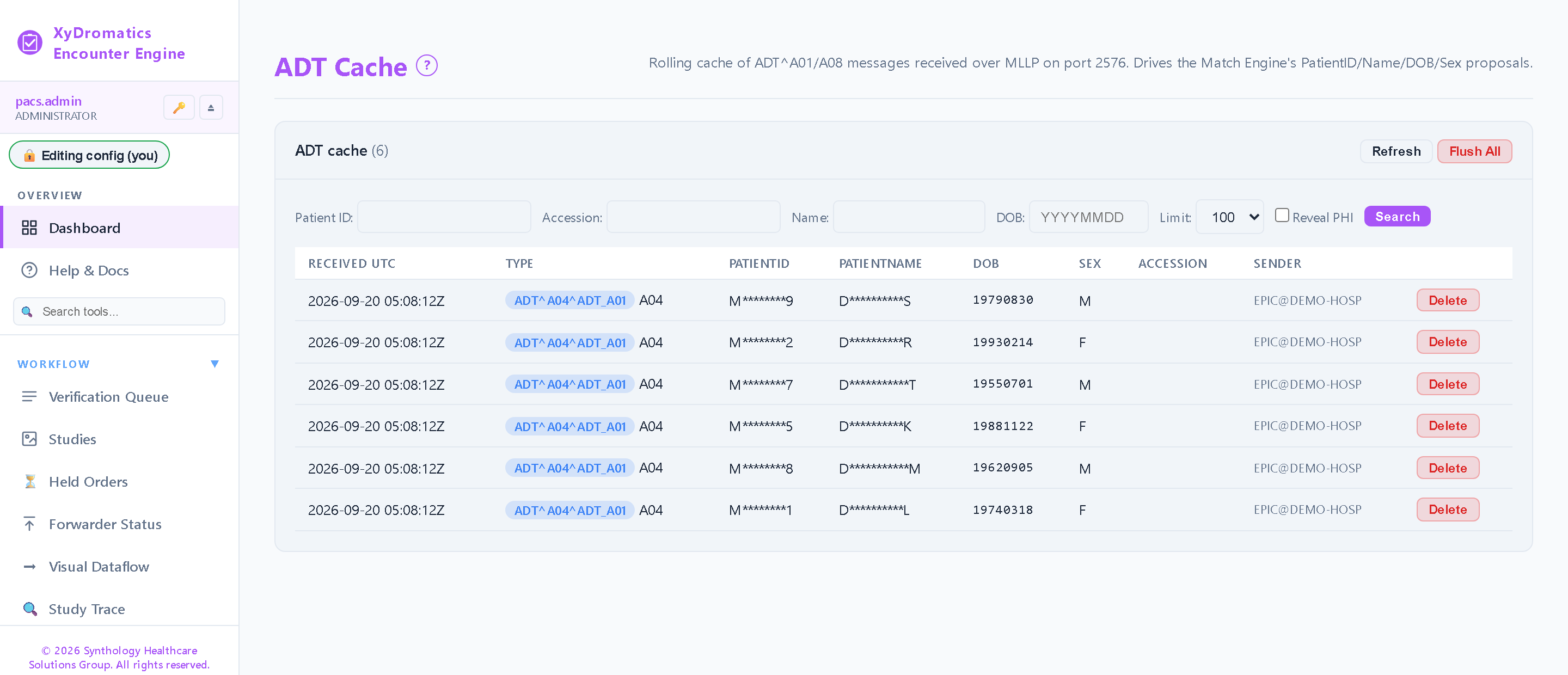
The ADT feed tells Encounter Engine who the patient IS — an encounter-identity index built from the identity-bearing events, not a bed map. Match incoming imaging against it to surface candidate encounters for a person to confirm.
Rolling encounter-identity cache with configurable retention (default 14 days)
C-FIND propose-only lookup as a fallback when the ADT cache has no match
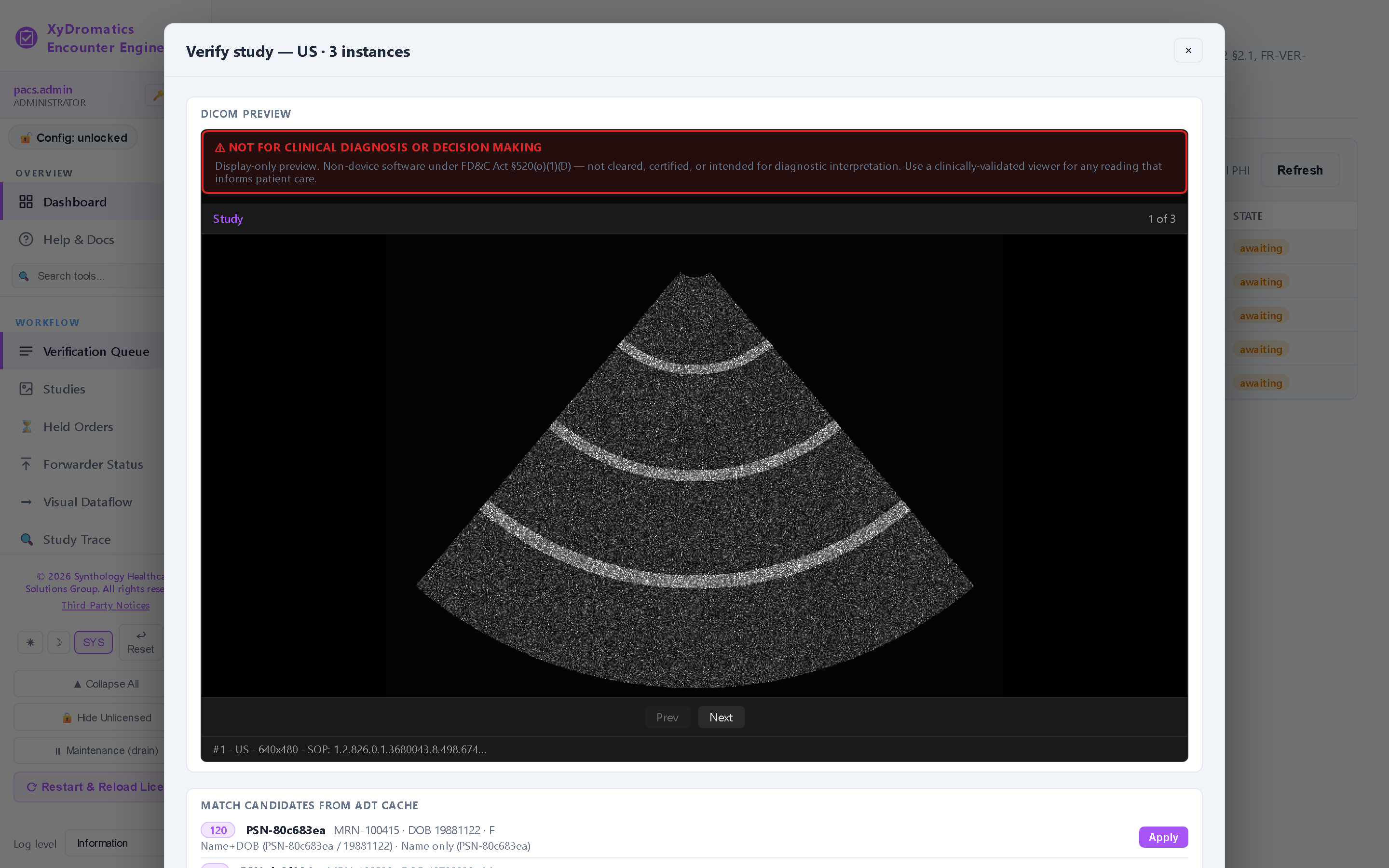
Deterministic scoring — exact Patient ID (100), exact accession (90), name plus date of birth (70), name only (50), most-recent ADT breaks ties
Multi-candidate disambiguation when ADT shows multiple patients in scope
No-match fallback to manual identification
Mandatory human-verification gate
The regulated boundary that keeps this product non-device software. A clinician confirms patient identity before the study moves downstream. Engine never auto-attributes.
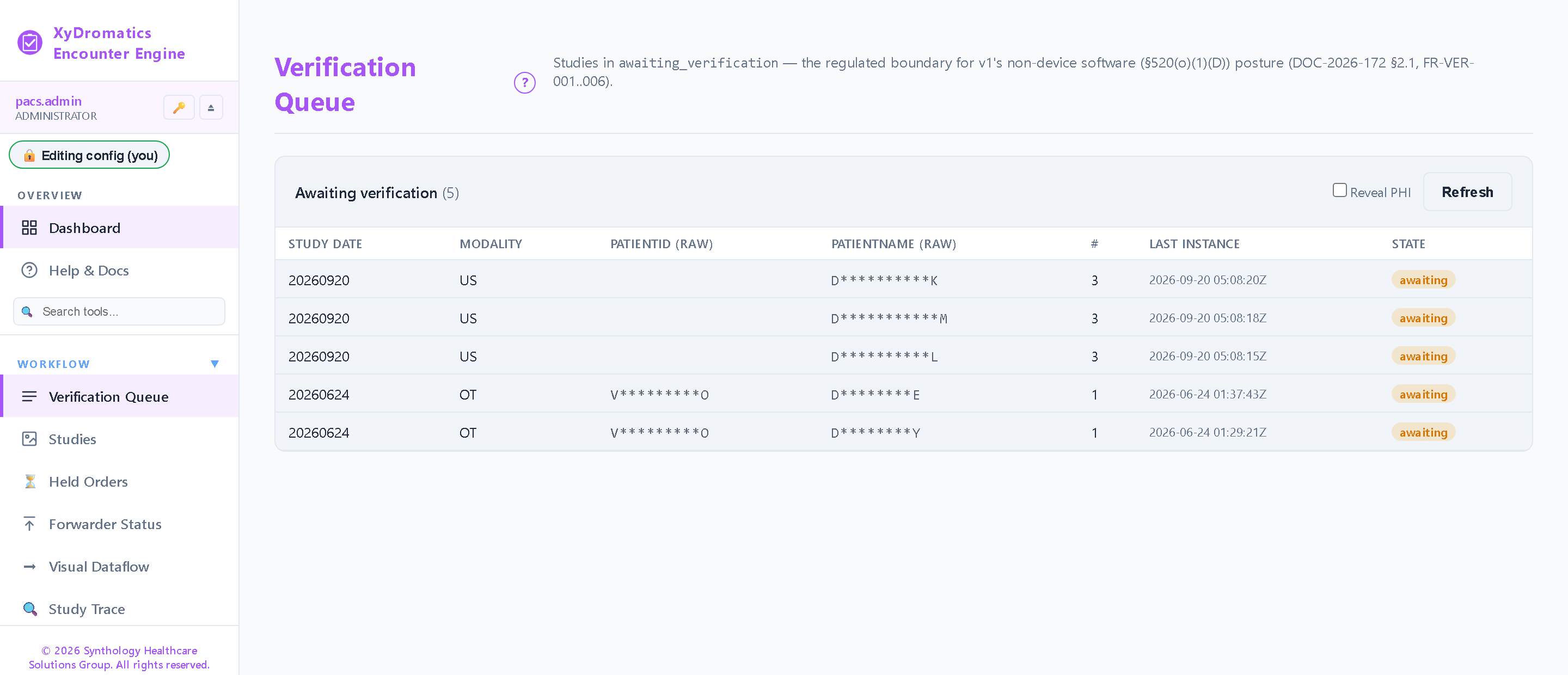
Clinician-facing UI shows ADT-matched candidate(s) and the imaging in question
Required confirmation step (no time-saving auto-bypass)
Reason text required when rejecting or quarantining a study
Audit trail records the verifying clinician's identity, timestamp, and chosen match
Verification is a one-way commit — once accepted the study is stamped and forwarded; corrections are made in the receiving PACS / VNA and EMR
Quarantine queue for studies where no confidence-eligible match exists
EMR back-fill (the encounter loop)
Once a study is verified, Encounter Engine generates the order retroactively in the EMR — closing the loop that started without an order in the first place.
HL7 ORM^O01 generation back to the EMR (creates the order retrospectively)
FHIR ServiceRequest generation as alternative to HL7 v2
Universal service ID derived from the study modality (e.g. US^US STUDY), with a generic DICOM_STUDY fallback
Order and accession created in the EMR, so the encounter becomes billable through the EMR's own revenue cycle
Audit trail captures every back-fill with reason text
Order-response reconciliation (Placer / Filler accession) with a timeout that parks the study in an order-exception queue for operator re-send
Forward to PACS / VNA after verification
Verified-and-tagged studies flow to the standard archive destinations with proper patient ID, accession number, and order linkage now attached.
C-STORE SCU forwarding to PACS / VNA
Tag transformation during forward (apply the verified patient ID + accession number)
Multi-destination fan-out (PACS + VNA + AI vendor concurrent forwarding)
Failed-forward retry with dead-letter queue
Audit trail end-to-end
Family-platform features
Same family-wide platform features as the rest of the router-pattern hosts.
Keyed-hash pseudonymization with shared site encryption key
Reversible pseudonymization — the re-identification map, customer ID and key version travel sealed inside the study, for restoration by a product that implements the de-anonymization leg
AI-vendor PHI shielding on the outbound leg — keyed-hash pseudonymization per destination
Web administration UI with shared sidebar shell
Role-based access control with full permission catalog
Open a study: the DICOM preview (display-only, never for diagnosis), the ADT candidates the match engine scored, and the 3-column diff — what the probe sent, what the feed proposes, what the verifier commits with Accept & Send.
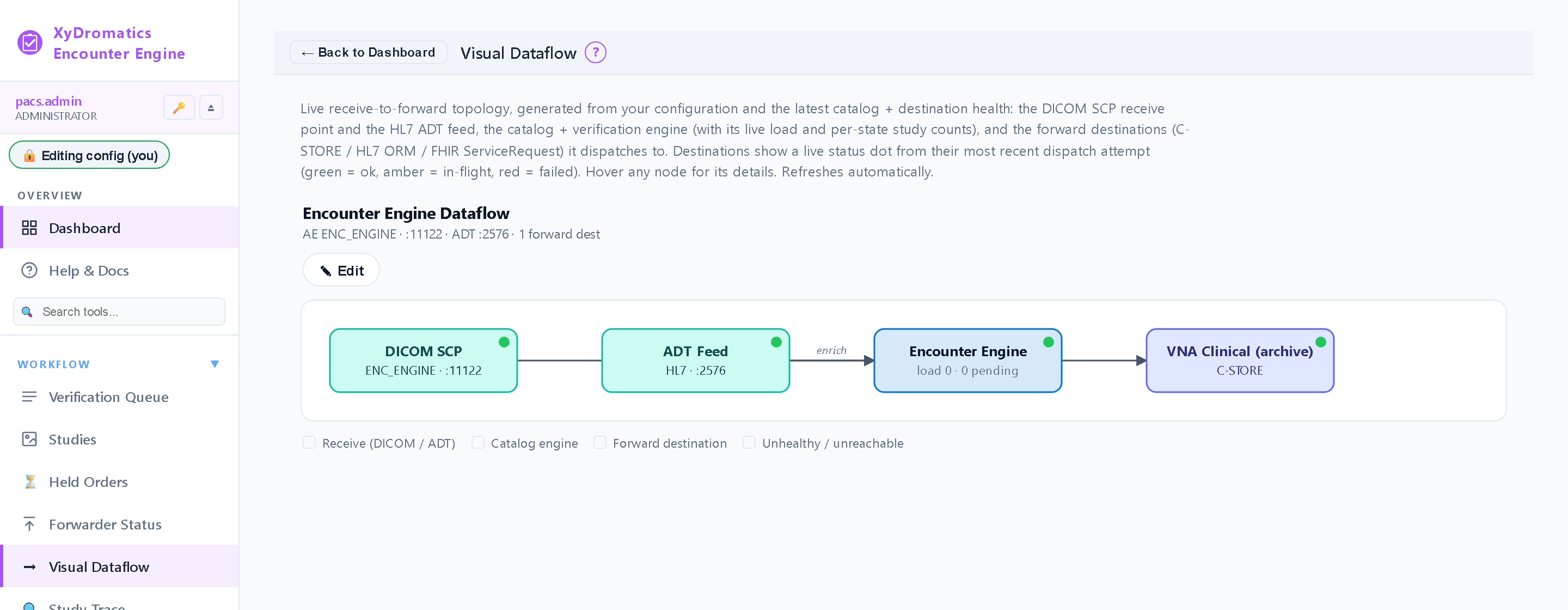
The diagram below shows the encounter-loop closure.
Modalities feed imaging; the EMR feeds ADT context; clinicians
confirm matches at the gate; verified studies forward to
PACS / VNA; the EMR receives the back-filled order.
Use cases
Six encounter-driven workflows.
The same orphan-study problem shows up across many clinical
contexts. The patterns below cover the most common deployment
shapes; institutions typically combine two or three.
Pattern 1
POCUS (point-of-care ultrasound) at the bedside
The defining use case. A hospitalist, intensivist, or ED physician grabs a portable ultrasound, scans a patient at the bedside, and walks away. Without Encounter Engine, that study lands in PACS as an orphan: no order, no billing capture, no record in the EMR. Encounter Engine closes the loop.
Flow
1Clinician scans patient with portable ultrasound (no pre-existing order)
2Modality emits DICOM to Encounter Engine
3Engine looks up candidate encounters in the rolling ADT identity cache by Patient ID, accession number, and name plus date of birth
4Clinician sees candidate match(es) in the verification UI, confirms patient identity
5Engine generates HL7 ORM^O01 back to EMR (order created retroactively)
6Verified study forwarded to PACS / VNA with proper accession number + patient ID
7EMR shows the encounter has imaging; revenue cycle captures the charge
Pattern 2
ED bedside imaging
The ED is a chaotic environment where pre-ordering imaging isn't always feasible — a trauma comes in, the FAST exam happens before anyone enters an order. Encounter Engine catches the orphan study at intake, verifies the patient, and back-fills the order so the encounter is complete in the EMR.
Flow
1Patient arrives in ED, FAST or other point-of-care exam performed before formal order
2Modality (portable US, X-ray, etc.) emits DICOM to Encounter Engine
3Engine matches the study against the cached ADT identity events and surfaces the candidate ED encounters
4ED clinician verifies match in the UI (often the same clinician who did the exam)
5EMR ORM^O01 back-fills the order
6Study forwards to PACS / VNA with proper attribution
Pattern 3
ICU bedside imaging
ICU patients receive frequent bedside imaging (chest X-ray, US for line placement, etc.) where the imaging often happens before the EMR-side order catches up. Same pattern: catch at the engine, verify, back-fill the order.
Flow
1ICU bedside imaging happens (chest film, US line-placement, etc.)
2Modality emits DICOM to Encounter Engine
3Engine matches against the cached ADT identity events; each candidate carries its patient location, so the bedside RN can tell the right patient apart
4Bedside RN or RT verifies the patient match in the UI
5EMR back-fill generates the order retrospectively
6Study forwards to PACS / VNA
Pattern 4
Intra-operative imaging
Sterile-field intra-operative imaging (C-arm fluoroscopy, intra-op US, intra-op MRI / CT) often happens without an EMR-side order because the surgeon can't step away from the field to enter one. Encounter Engine handles the orphan-study cleanup post-procedure.
Flow
1Intra-op imaging happens during a procedure
2Modality emits DICOM to Encounter Engine
3Engine matches the study against the cached ADT identity events for the surgical encounter (ADT only — SIU scheduling messages are acknowledged but not cached)
4Verification happens post-procedure (circulating nurse or surgeon-of-record)
5EMR back-fill generates the order against the surgical encounter
6Study forwards to PACS / VNA, attached to the right surgical case
Pattern 5
Trauma bay imaging
Trauma activations are urgent: a trauma patient needs imaging immediately, and the formal order placement happens later. Encounter Engine keeps the imaging from going orphan during the time-critical window.
Flow
1Trauma activation, patient arrives in trauma bay
2Imaging (CT, X-ray, FAST US) happens immediately
3Modality emits DICOM with whatever placeholder demographics the tech entered
4Engine matches against the cached ADT identity events, including the John-Doe registration
5Trauma team member verifies match (often a tech or RN who knows the patient)
6EMR back-fill creates the trauma-encounter orders post-hoc
7Studies forward to PACS / VNA, properly attached
Pattern 6
Outpatient point-of-care workflows
Outpatient clinics increasingly do point-of-care imaging (cardiology echo for new-symptom evaluation, MSK ultrasound during a clinic visit, primary-care POCUS). Same orphan-study problem; same fix.
Flow
1Clinic visit triggers point-of-care imaging during the encounter
2Modality emits DICOM to Encounter Engine
3Engine matches against the cached ADT identity events for the clinic encounter (ADT only — scheduling feeds are not consumed)
4Clinician verifies patient match
5EMR back-fill generates the order against the clinic encounter
6Study forwards to PACS / VNA, attached to the clinic encounter
Integration points
Modalities, EMR, archive — three integration surfaces.
Imaging input (modalities)
Portable ultrasound (POCUS) — any DICOM-conformant US scanner
ED bedside imaging — portable US, portable X-ray
ICU bedside imaging — portable chest X-ray, US for line placement
Append-only HIPAA audit log — count-capped ring with archive-before-evict to a durable 6-year store (45 CFR 164.316(b)(2))
Read-only audit API (/api/audit) plus the on-disk audit log, for SIEM collection
Operational metrics on /api/health, consumed by SynthIQ and the SynthGateway engineer console
Structured Serilog logging to console and rolling files
SMTP alerts on terminal forward failure and disk-watermark crossings (hourly-throttled)
Availability
One instance, and that is deliberate.
Encounter Engine is a stateful workflow application. Every study, ADT
record, pending order and audit entry lives in one encrypted local
catalog, and a clinician’s verification click is the step that
moves work forward. That is what the human-verification gate rests on,
so the availability question here is not how many run in parallel
— it is how fast one comes back with nothing lost.
The catalog is crash-durable, so a restart resumes exactly where it
left off. A study caught mid-receive re-arms rather than being lost,
failed downstream forwards retry automatically against an append-only
attempt log, and a placer order that returns after a restart still
reconciles against the encounter it belongs to.
We will not tell you to run two behind a load balancer. Two instances
would hold two divergent halves of one workflow, and the verification
gate would stop meaning what it says.
Encounter Engine sizing follows the verified-encounter volume
per day. The verification gate is the throughput floor —
even a low-spec deployment can handle thousands of encounters
a day at human-verification speed (the gate isn’t the
bottleneck; clinician availability is).
Tier
Encounter volume
CPU
RAM
Typical site
Small (single department)
< 100 verified encounters / day
4 vCPU
8 GB
ED-only or ICU-only deployment, single-department POCUS workflow.
Medium (hospital-wide)
100 – 500 verified encounters / day
8 vCPU
16 GB
Hospital-wide deployment covering ED + ICU + OR + outpatient point-of-care.
Large (multi-site)
500 – 2,000 verified encounters / day
16 vCPU (single node)
32 GB per node
Multi-hospital health system, multi-site POCUS programs, busy academic ED + ICU.
Enterprise
> 2,000 verified encounters / day
32 vCPU (single node)
64 GB per node
Large IDN with distributed POCUS programs across many sites.
Licensing
Three packages.
Encounter Engine ships as one binary under one licence, and a
valid licence enables every capability it has — DICOM ingest,
ADT matching, the verification gate, PACS / VNA forwarding, EMR
back-fill by HL7 ORM^O01 or FHIR R4 ServiceRequest, and keyed-hash
pseudonymization on export. What varies commercially is how many
installations the licence covers and what services wrap it.
Single site
One facility. The licence names how many Encounter Engine installations it covers.
Every capability the engine ships
DICOM ingest, ADT matching and the human-verification gate
EMR back-fill by HL7 ORM^O01 or FHIR R4 ServiceRequest
Keyed-hash pseudonymization on export, per destination
Standard support
Multi-site
Several facilities under one agreement, with the install count sized to the estate.
Everything in Single site
Site-discounted install pricing
Cross-product site-key sharing across the XyDromatics family
Deployment and EMR-integration services available
Enterprise
An entitlement to deploy without an install ceiling, plus the Enterprise services tier.
Everything in Multi-site
No install ceiling — deploy as the estate grows
Managed service — Synthology-operated monitoring and response
Contracted support response commitments
Per-deployment licensing. Multi-product bundles (Encounter
Engine + Router + archive family + other engines) get bundle
pricing and shared site-key provisioning.
Documentation
The controlled-document set.
Current GA release
v1.0.1.146·released 2026-08-05
Every Encounter Engine deployment ships with the documents below, all managed under SynthQMS document control. The DICOM Conformance Statement is publicly available; the rest are shared under mutual NDA.
What’s new·v1.0.1.146
At-rest encryption for staged studies
▸Inbound study-staging data is encrypted at rest under the customer key hierarchy.
▸Support-role sessions cannot access patient data — enforced by access control.
▸Ships with the approved EULA and refreshed documentation, and clears a full QA and security-test pass.
How the human-verification gate functions; clinician training material
Frequently asked
The questions clinical IT asks.
What is "POCUS-style encounter workflow" and what problem does it solve?
POCUS = point-of-care ultrasound -- bedside ultrasound performed by a clinician (hospitalist, intensivist, ED physician) without a pre-existing order in the EMR. The traditional radiology workflow assumes the order exists first, then the imaging happens. POCUS reverses that: imaging first, no order. The study lands in PACS as an "orphan" -- no order to attach to, no patient ID match, no billing capture, EMR doesn't know the imaging happened. Multiply that across an ED, ICU, OR, and clinic and you have meaningful revenue leakage and incomplete patient records. Encounter Engine catches the orphan, verifies the patient via human-confirmed ADT match, back-fills the EMR order retroactively, and forwards the cleaned-up study to the archive.
Why a mandatory human-verification gate? Why not auto-match?
Two reasons. Regulatory: the human gate is what keeps this product on the Non-device software side of the line. Auto-attribution of imaging to a patient without human verification crosses into clinical-decision territory that would push the regulatory classification up. Clinical: ADT matching gives candidates, but wrong-patient errors at the verification stage are clinically significant. A clinician confirming "yes, this is patient X" is the right safeguard. Engine never auto-attributes; the gate is mandatory and audit-trailed.
How does ADT matching actually work?
Encounter Engine subscribes to the EMR's HL7 v2 ADT feed over MLLP and caches the identity-bearing events: A01 admit, A04 register, A05 pre-admit, A08 update, A28 and A31 person add and update, and A40 patient merge. That cache is an encounter-identity index, not a bed map — it answers who this patient is, not which room they are in. When an unidentified study arrives, the engine looks up candidate encounters and presents them in the verification UI with enough context for a person to accept one or reject the study. A merge event re-points the affected identities rather than leaving a stale match behind.
What if the wrong patient is selected during verification?
The hash-chained audit trail records every verification with the verifying user's identity, the timestamp, and the committed identity fields (patient ID, name, date of birth, sex, accession) — enough to answer who stamped what onto which study. Verification is a one-way commit: once a study is accepted it is stamped and forwarded, and Encounter Engine does not re-open it. A mis-attribution found downstream is corrected in the receiving systems — the PACS / VNA and the EMR — through their own correction workflows; Encounter Engine emits new orders only (ORC-1 = NW), never cancellations. A study caught before acceptance can be rejected or quarantined, both of which require reason text.
How does Encounter Engine integrate with Epic / Cerner specifically?
Standard HL7 v2 / FHIR interfaces -- ADT subscription inbound, ORM^O01 / ServiceRequest outbound. Both Epic and Cerner expose these natively; the integration is straightforward HL7 / FHIR work, not vendor-specific custom development. Encounter Engine creates the order and accession in the EMR, so the encounter becomes billable through the EMR's own revenue cycle rather than through a charge tag emitted here. Any EMR exposing HL7 v2 or FHIR R4 works the same way.
Can Encounter Engine handle modalities that don't emit DICOM?
No. Encounter Engine is a DICOM-receive front door. Modalities that emit non-DICOM formats (proprietary US streaming, raw image files, etc.) need a converter upstream. For ultrasound specifically, modern POCUS scanners emit DICOM by default; older scanners or research-grade devices may need a DICOMization layer first.
How does the AI-vendor PHI-shielding workflow work here?
Same family-wide keying as the Router, the archive family, SR Engine, Migration Engine and Pathology Engine — one per-customer site key, so a patient resolves to the same pseudonym across every product you run. Encounter Engine performs the OUTBOUND leg: it pseudonymizes the verified study per destination on the way out, and seals the re-identification map, customer ID and key version inside the study itself. Restoring identity on the return leg is done by the product that receives the findings — the Router or an archive host — not by Encounter Engine. It is included with the product, not a licence tier.
What's the regulatory classification?
Non-device software under FD&C Act §520(o)(1)(D), the 21st Century Cures Act §3060 carve-out for software that transfers, stores, converts, or displays device data without interpreting or analyzing it. Same framework as the rest of the engines family. The mandatory human-verification gate is what keeps the product within the non-device carve-out -- auto-attribution of imaging to a patient without human confirmation would push the regulatory posture to a device classification; the gate preserves the storage-and-forwarding-without-clinical-interpretation framing of §520(o)(1)(D).
Is Encounter Engine cross-platform?
Yes -- Windows and Linux, same as the rest of the router-pattern family except for Pathology Engine. MSI installer for Windows, self-contained Linux tarball for Linux. Encounter Engine runs as a single instance; redundancy is delegated to the host OS cluster manager (WSFC on Windows, Pacemaker on Linux), so a standby pair is single-platform by construction.
Plan an encounter-driven workflow.
Tell us where the orphan-study problem hits hardest in your
environment — POCUS, ED, ICU, OR, trauma, outpatient — and
we’ll come back within one business day with a proposed
deployment and EMR-integration approach.