Expanded in-app help, refreshed guides, and streamlined remote support
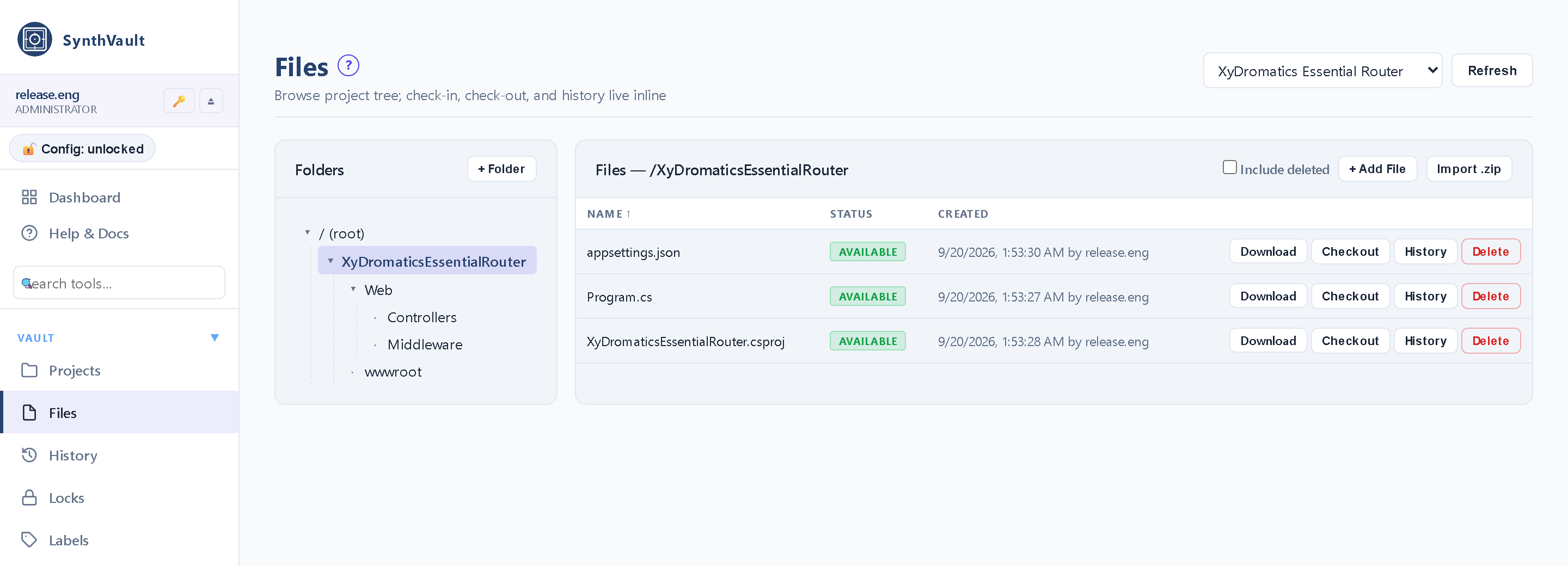
▸Built-in Help across the administration console — each topic opens with a plain-language overview, a step-by-step workflow, and a worked example, so you can find the answer and see exactly how to do it without leaving the app.
▸Refreshed End-User Guide and license documentation.
▸Engineer-assisted remote support connects on its own wherever your license includes it — no per-site setup — and stays off when it isn’t licensed or enrolled.
▸Ships with the approved End-User License Agreement and clears a full QA + security-test pass on the release build.
SynthVault™ —
the regulated authority for what was approved when.
Versioned file vault designed for regulated environments.
Source-control-style checkout / checkin, SHA-256 hash-
chain audit, periodic integrity sweeps, webhooks for
integration with build pipelines and document workflows,
backup / restore. The audit evidence a regulated
record-keeping programme is built on. Used internally as the storage substrate
beneath
SynthQMS and
available standalone for any organization needing
versioned, audit-trailed file storage.
Not a medical device — same platform-tooling category as
SynthQMS. Different role: SynthVault holds the file content;
SynthQMS handles the workflow surface around it. Many
customers run both together; some run SynthVault standalone
for use cases that don’t need the QMS workflow.
SynthVault is the versioned-storage substrate for regulated
file content. It holds the bytes; it tracks who changed
what and when; it proves nothing was tampered with. Beyond
that, it deliberately doesn’t do much — the
workflow surface around files lives in SynthQMS or in
other systems that integrate via the webhook surface.
SynthVault IS
A versioned file vault
SHA-256 hash-chain audit
Integrity-verified storage
License-gated Part 11 mode
The substrate beneath SynthQMS
Cross-platform (Windows + Linux)
Standalone-licensable
SynthVault IS NOT
A workflow-management system (that’s SynthQMS)
A general-purpose collaborative DMS (that’s SharePoint)
A source-control system (that’s git)
A medical device
A multi-tenant SaaS (single-tenant standard)
A clinical document store (that’s the archive family)
SynthVault works with all the things it isn’t.
SynthQMS uses SynthVault as its storage substrate. Build
pipelines pull source from git and push artifacts to
SynthVault. SharePoint mirrors SynthVault content for
broader collaborative reach. The archive family stores DICOM
in its own purpose-built archive that follows similar
principles. Each tool, its job.
Capabilities
Versioning, audit, integrity, retention.
Eight capability areas covering the full vault surface — from
the everyday checkout / checkin workflow through the
hash-chain audit and integrity-sweep tooling that makes the
vault defensible to regulators.
Checkout / checkin / version history
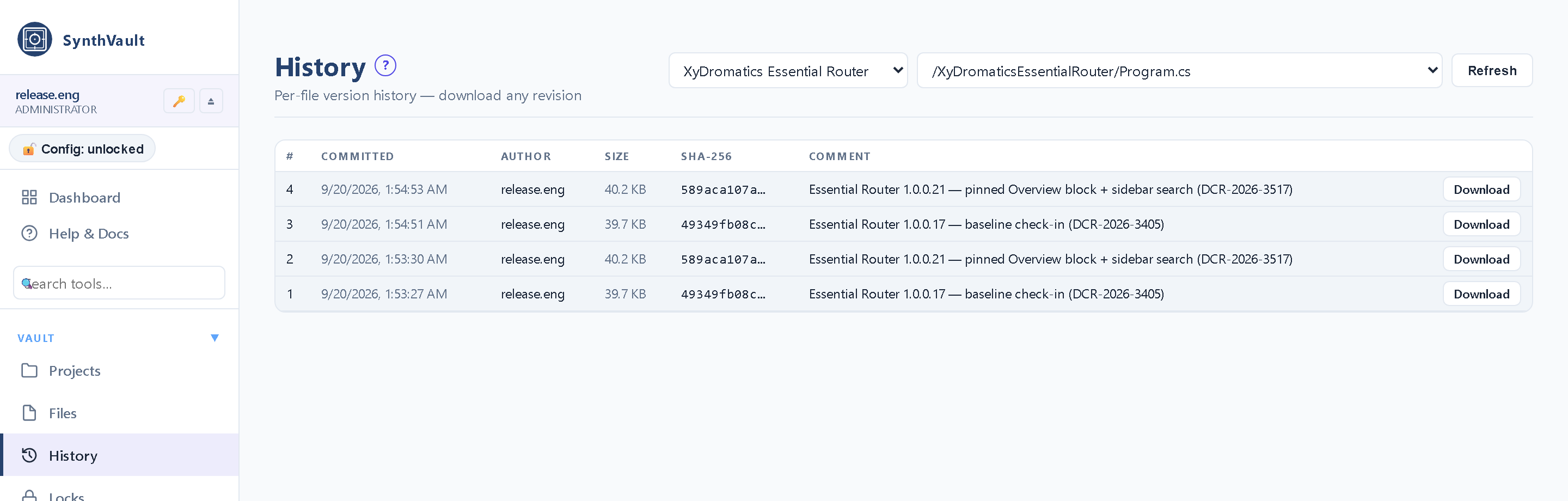
Source-control-style workflow for any file type. Lock the working state, edit, check the new version back in. Full version history retained.
File-locking checkout (one editor at a time per file)
Checkin produces a new immutable version with metadata
Per-file version history with diff-style comparison where applicable
Pre-commit / post-commit hook points for validation
Branch-style "working set" support for multi-file edit groups
Hash-chain audit log
Every checkin produces a chain entry. SHA-256 over (file content + timestamp + author + previous chain root). Tampering is detectable.
SHA-256 content hashing on every stored version
Chain entries linking each version to the previous chain root
Independent integrity-sweep tool re-walks the entire chain
Mismatch detection at any chain position
Audit-record export with cryptographic receipts
Chain-root publication for off-host tamper-evidence
Integrity sweeps
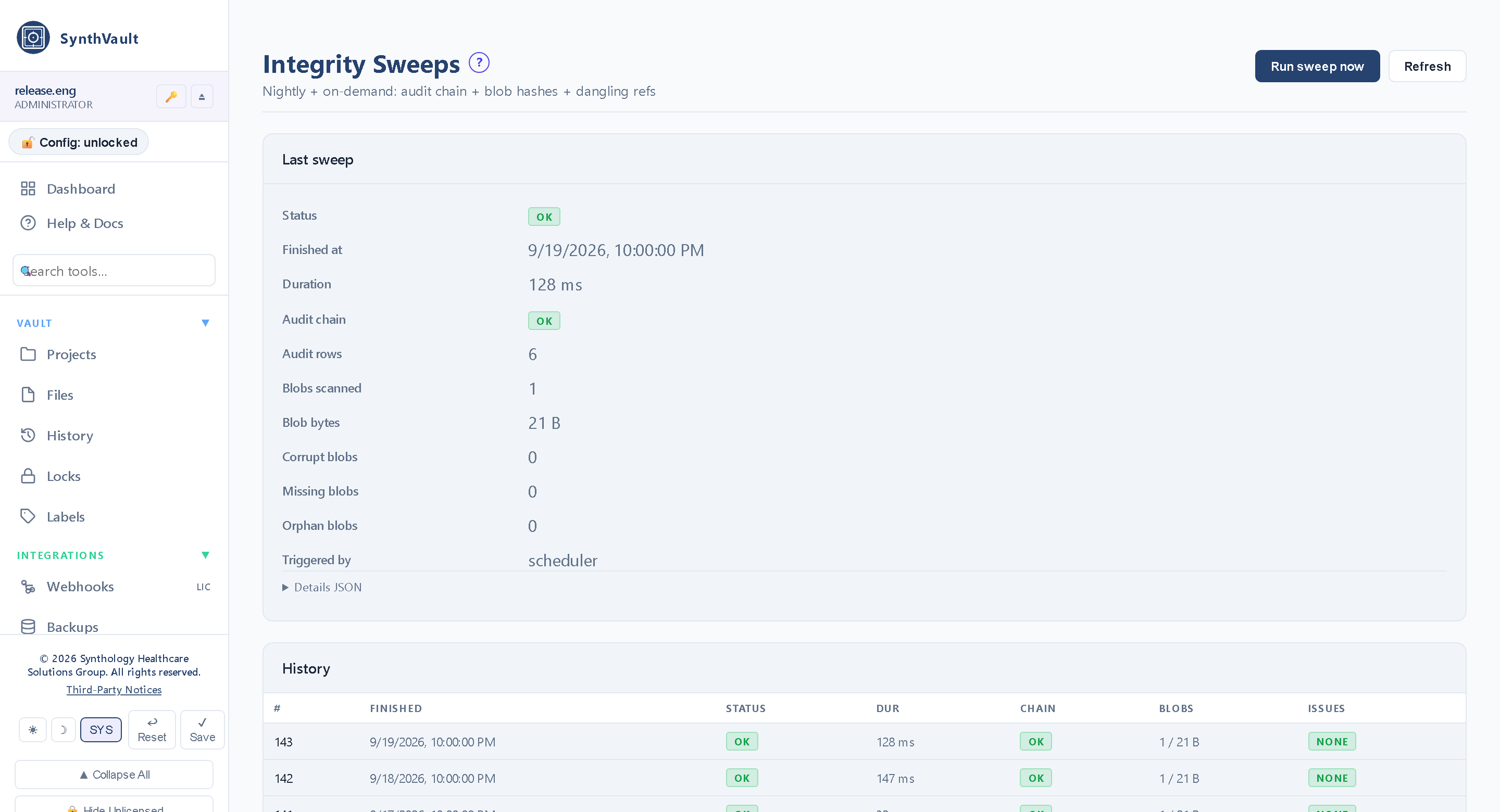
Periodic full re-verification of every stored file against its hash chain. Catches silent storage corruption and ensures the audit chain still reconciles.
On-demand full-vault verification — the same three-pass sweep the scheduler runs, triggered from the UI
Mismatch quarantine with documented remediation workflow
Sweep-completion reports for inspections
Per-sweep integrity reports naming every offending blob (corrupt, missing and orphan lists), retained per run
Storage-backend-agnostic (works against local FS, S3, NAS)
Webhooks
External systems get notified on every checkin. The integration surface for build pipelines, document workflows, and downstream archives.
Webhook subscriptions filtered by event-type prefix (file., label., integrity., or everything), applying across the whole vault
Configurable payload (full file metadata vs minimal)
Retry policy with dead-letter queue
Webhook signing for receiver verification
Used by SynthQMS for document-mirror automation
Used by build pipelines for artifact-promotion triggers
Project + folder organization
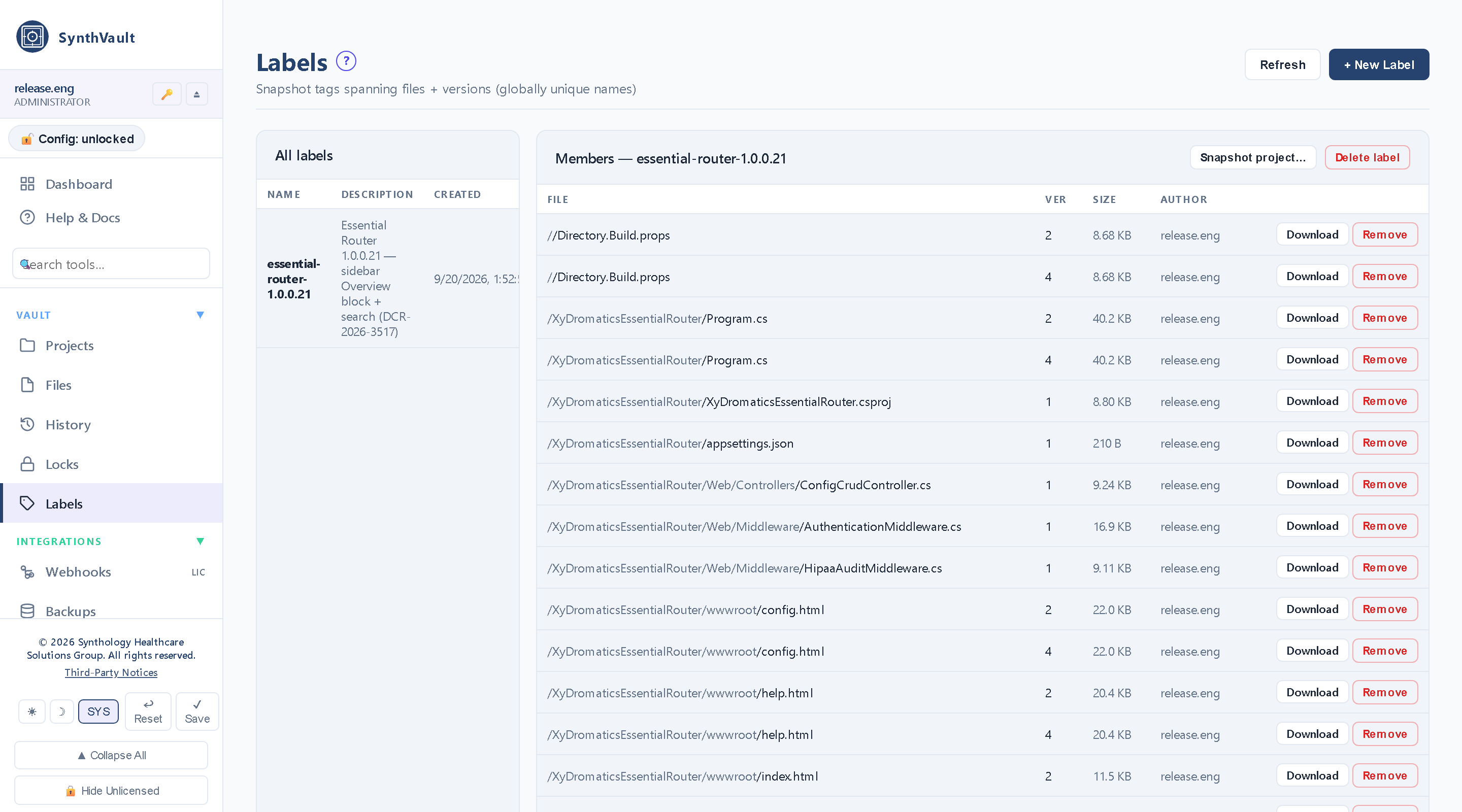
Hierarchical organization within the vault. Per-project access control, folder trees inside each project, and cross-project labels that pin specific file versions.
Project-level access control (project members + roles)
Folder hierarchy within projects
Folder create, rename and delete gated by the caller's project role (a delete refuses a non-empty folder)
Tag-based search across the vault
Project-level audit-trail filtering
Cross-project links for related files (e.g., MSI build references source-tree project)
Evidence for a Part 11 programme
SynthVault does not implement 21 CFR Part 11 on your behalf, and we will not tell you it does. What it provides is the record a Part 11 programme is built on — tamper-evident, complete, and yours to audit.
Hash-chained audit log — every action linked to the one before it, so a deleted or altered entry is detectable
Immutable version history — a revision supersedes its predecessor rather than overwriting it
Checkout / checkin with required reason text, so the why is captured alongside the what
Scheduled integrity sweeps that re-verify stored content against its recorded hash
From the default deployment shape (storage substrate beneath
SynthQMS) through the standalone patterns where SynthVault
carries the load on its own — source archives, build
artifacts, regulatory submissions, legal hold, engineering specs.
Pattern 1
Storage substrate beneath SynthQMS
The default deployment shape. SynthQMS handles the QMS + CRM workflow surface; SynthVault stores the actual file content with version history + hash-chain audit. Customers running both products get the integration for free.
Flow
1SynthQMS document-control workflow approves a new document version
2On approval, SynthQMS checks the file into SynthVault
3SynthVault returns a versioned URI + SHA-256 hash
4SynthQMS stores that URI + hash in the document record
5Any later retrieval pulls from SynthVault with integrity verification
6Audit trail spans both products end-to-end
Pattern 2
Source-tree archive for regulated software development
Standing Synthology rule: every source file change to a Synthology product round-trips through SynthVault. Source code lives in git for working state; SynthVault holds the regulated authority for what was approved when. Customers building their own regulated software adopt the same pattern.
Flow
1Developer makes a source-tree change
2Pre-commit: source file checked out of SynthVault
3Edit + test in the working environment
4Post-edit: file checked back into SynthVault with reason text
5Hash-chain entry written; webhook fires for build-pipeline automation
6Build pipeline pulls the approved version of the source for the build
Pattern 3
Build artifact archive (MSI, tarball, .sha256)
Every build artifact (MSI installer, Linux tarball, container image, signed binary) checks into SynthVault with its hash. Year-later questions about "what was in version X.Y.Z" answer themselves — vault has the artifact + its provenance.
Flow
1Build pipeline produces an artifact (MSI / tarball / etc.)
2Artifact + .sha256 checksum file checked into SynthVault
3SynthVault stores both with chain-entry linkage
4Released-Versions catalog references the SynthVault URI
5Inspections / audits / customer escalations pull the exact build artifact from the vault
6Tombstone semantics for retired versions (kept in vault, marked superseded in catalog)
Pattern 4
Regulatory submission package vault
Regulatory submission packages contain dozens of controlled documents. SynthVault holds the canonical version of every document referenced in the submission, with hash-chain proof of what was sent on what date.
Flow
1Submission package authoring in SynthQMS (or directly in SynthVault for non-SynthQMS users)
2Each component document checked into SynthVault as it's finalized
3Final submission "snapshot" assembled from versioned vault references
4Hash chain proves what was submitted at submission time
5Subsequent communication with FDA references vault URIs
6Post-submission retention managed per Part 11 mode (if licensed)
Pattern 5
Legal hold + e-discovery archive
A litigation hold or regulatory-inquiry hold demands extraction of all materials related to a specific topic / patient / product. SynthVault's tagging and audit-trail surfaces let counsel produce a defensible record without scrambling.
Flow
1Legal hold scope defined (specific patient ID / product version / date range)
2SynthVault search across project folders and tags
3Matching files exported with their full audit history
4Hash-chain receipts produced for every exported file
5Bundle handed to counsel with cryptographic provenance
6Vault retains the originals; the export is a documented copy
Pattern 6
Engineering specification repository
Engineering specs, design history files, risk-management files, threat models — the regulated-design-control artifacts that need to live somewhere with version + audit. SynthVault is the right place for them when you don't want to put them in source-control or in a generic DMS.
Flow
1Engineering team authors a spec / DHF / RMF / threat-model document
2Document checked into SynthVault's engineering-specs project
3Per-document approval workflow (if integrated with SynthQMS) or direct vault commit
4Subsequent revisions go through checkout / checkin with reason text
5Audit trail provides the design-control history regulators want to see
6The hash-chained audit log and immutable version history give a Part 11 programme its underlying record
Integration points
Writers, readers, storage, identity.
Inbound (writers / consumers)
SynthQMS document-control workflow (the most common writer)
Build pipelines (CI/CD systems checking in artifacts)
Source-control workflows (developer commits round-tripped per the standing rule)
One content-addressed blob store per vault instance, shared by every project — its root directory is relocatable onto a larger volume
Content blobs are addressed by their SHA-256, so they are stored unencrypted by design — encrypting them would defeat de-duplication. At-rest sealing covers credentials and config secrets under key-escrow scopes, and off-site backup bundles are encrypted
Catalog + content store
Embedded SQLite catalog in WAL mode — no database server to provision
Content-addressed blob store on the local filesystem, sharded by hash
Online backup of the catalog while the vault stays writable
Restore requires the service to be stopped — it is not an online operation
Identity, audit, observability
Local accounts with RBAC, plus optional LDAP / Active Directory bind
Active Directory via LDAP bind (server, port, TLS, bind-DN template with group-to-role mapping)
Per-action audit trail entries
Hash-chain audit log
Integrity-sweep results visible on the dashboard
Serilog console and rolling-file logs plus a structured-JSON audit log
HMAC-signed outbound webhooks with a per-subscription event filter (single delivery attempt; last status is shown in the UI)
System requirements & sizing
Sized to file count + total storage.
The catalog database scales with file count; the storage
backend scales with total content volume. Most deployments
pair a modest catalog DB with an S3 or NAS storage tier
for the bulk content.
Tier
Scale
CPU
RAM
Storage
Typical org
Small (single team)
< 10,000 files · < 100 GB
2 vCPU
4 GB
500 GB working
Single-team document vault, regulated software development at small scale.
Mid-sized organization
10,000 – 1M files · 100 GB – 5 TB
4 vCPU
16 GB
10 TB working set
Mid-sized med-device company with active document-control workflow, build-artifact archive, source archive.
Large organization
1M+ files · 5 – 50 TB
8 vCPU
32 GB
50+ TB tiered
Enterprise med-device organization with extensive controlled-document set, multi-product engineering teams, regulated software at scale.
Licensing
One licence. The whole vault.
There is no feature lane held back for a later upsell and no
capability gated behind a higher tier — a valid licence
unlocks everything SynthVault ships. What varies commercially is
how many installations the licence covers and what services wrap
it. When the estate grows we reissue the licence for the larger
count.
Single site
One organization. The licence names how many SynthVault installations it covers.
Every capability the vault ships
LDAP / Active Directory authentication
HIPAA mode, scheduled hot backup, webhooks, large-file support
Standard support
Multi-site
Several sites or entities under one agreement, with the install count sized to the estate.
Everything in Single site
Site-discounted install pricing
Multi-product bundle pricing
Deployment and migration services available
Enterprise
An entitlement to deploy SynthVault without an install ceiling, plus the Enterprise services tier.
Everything in Multi-site
No install ceiling — deploy as the estate grows
Managed service — Synthology-operated monitoring and response
What the vault records, and how to produce it for an auditor
Pending
EULA Annex (SynthVault)
Annex to the Synthology Master EULA (DOC-2026-063)
Pending
Penetration Test Results (SynthVault)
Available under NDA
Pending
User Guide (SynthVault)
Operator + administrator + auditor workflows
Pending
Installation Guide (SynthVault)
MSI deploy + Linux tarball + database setup
Rows listed as Pending are not yet authored or
registered in SynthQMS. (When they are, they’ll be stored
in SynthVault — turtles all the way down.)
Frequently asked
The questions buyers ask.
How is SynthVault different from SynthQMS?
Different roles. SynthVault is the versioned-storage substrate -- it holds the actual file content with version history, hash-chain audit, integrity verification. SynthQMS is the QMS + CRM control plane that runs on top -- it handles the workflow (document approval, training records, CAPAs, etc.) and uses SynthVault as its storage layer. Many customers run both together; some run SynthVault standalone for use cases that don't need the QMS workflow surface (build-artifact archive, source-tree vault, engineering-spec repository, legal-hold archive).
How is SynthVault different from git?
Different scope. Git is for source code -- text-friendly, merge-friendly, designed for collaborative development. SynthVault is for any file type -- binary artifacts, documents, images, build outputs -- where the regulated authority of "what was approved when" matters more than merge collaboration. Synthology's own pattern: source code lives in git for working state; SynthVault holds the regulated authority for what was approved into a release. Both run; both are useful; they answer different questions.
How is SynthVault different from SharePoint?
SharePoint is a general-purpose document-collaboration platform with rich editing, sharing, search, and the broad Microsoft 365 integration. SynthVault is narrower and more rigorous: hash-chain audit, integrity sweeps, file-locking checkout, tamper-evident audit history. They're complementary -- SynthQMS uses SharePoint as a document mirror for off-host redundancy, and SynthVault as the authoritative versioned storage. For regulated artifacts where audit defensibility matters more than collaboration breadth, SynthVault. For general-purpose collaboration, SharePoint.
Does SynthVault make us 21 CFR Part 11 compliant?
No product can, and we would be wary of one that says otherwise. Part 11 compliance is a programme: validation, SOPs, training, signature manifestations and the controls around who may do what. What SynthVault supplies is the evidence layer underneath it -- a hash-chained audit log where an altered or deleted entry is detectable, immutable version history, checkout / checkin with captured reason text, and integrity sweeps that re-verify stored content. Auditors ask to see records; this is the system that produces them. The programme around it stays yours.
How does the hash-chain audit actually work?
Each checkin produces a chain entry with SHA-256 over (file content + timestamp + author identity + previous chain root + reason text). The chain root is the latest entry's hash; subsequent entries chain to it. Tampering with any earlier entry breaks the chain at that point and is detectable by the integrity-sweep tool. The chain root is publishable for off-host tamper-evidence -- print it, store it elsewhere, commit it to a git repo, etch it on a stone tablet -- and compare against the vault later to prove no rewrite happened.
Can SynthVault be deployed without SynthQMS?
Yes. SynthVault is fully standalone-licensable. Common standalone uses: build-artifact archive for regulated software companies, source-tree vault for regulated engineering teams, regulatory-submission-package vault, legal-hold / e-discovery archive, engineering-specification repository. SynthQMS is a great companion when you need the QMS workflow surface, but the vault stands on its own.
What about Microsoft Sentinel / Splunk / SIEM integration?
Webhook outputs forward audit events to any HTTP-receiving SIEM. Structured JSON log output works against Splunk, Sentinel, Datadog, or any log-collection platform. Prometheus metrics endpoint exposes operational state for monitoring. SynthVault doesn't aim to be its own observability platform -- it forwards what observability platforms want.
Cross-platform support?
Yes -- Windows and Linux. MSI installer for Windows, self-contained Linux tarball for Linux. Same parity as SynthQMS and most of the XyDromatics product family.
What's the largest file SynthVault handles?
Practical limits depend on the storage backend. Local filesystem and S3 both handle multi-gigabyte files cleanly; the catalog has no hard cap. Tested in production against WSI files (50 GB-500 GB each) when integrated with the XyDromatics Pathology Engine, and against multi-gigabyte MSI installers. Very-large-file workflows benefit from S3 multipart upload support and chunked retrieval.
Where does your regulated file storage live?
Source-tree archive, build-artifact archive, regulatory submissions,
legal-hold archive, engineering specs. Tell us what you need
to defensibly version + audit and we’ll come back
within one business day with a proposed deployment.